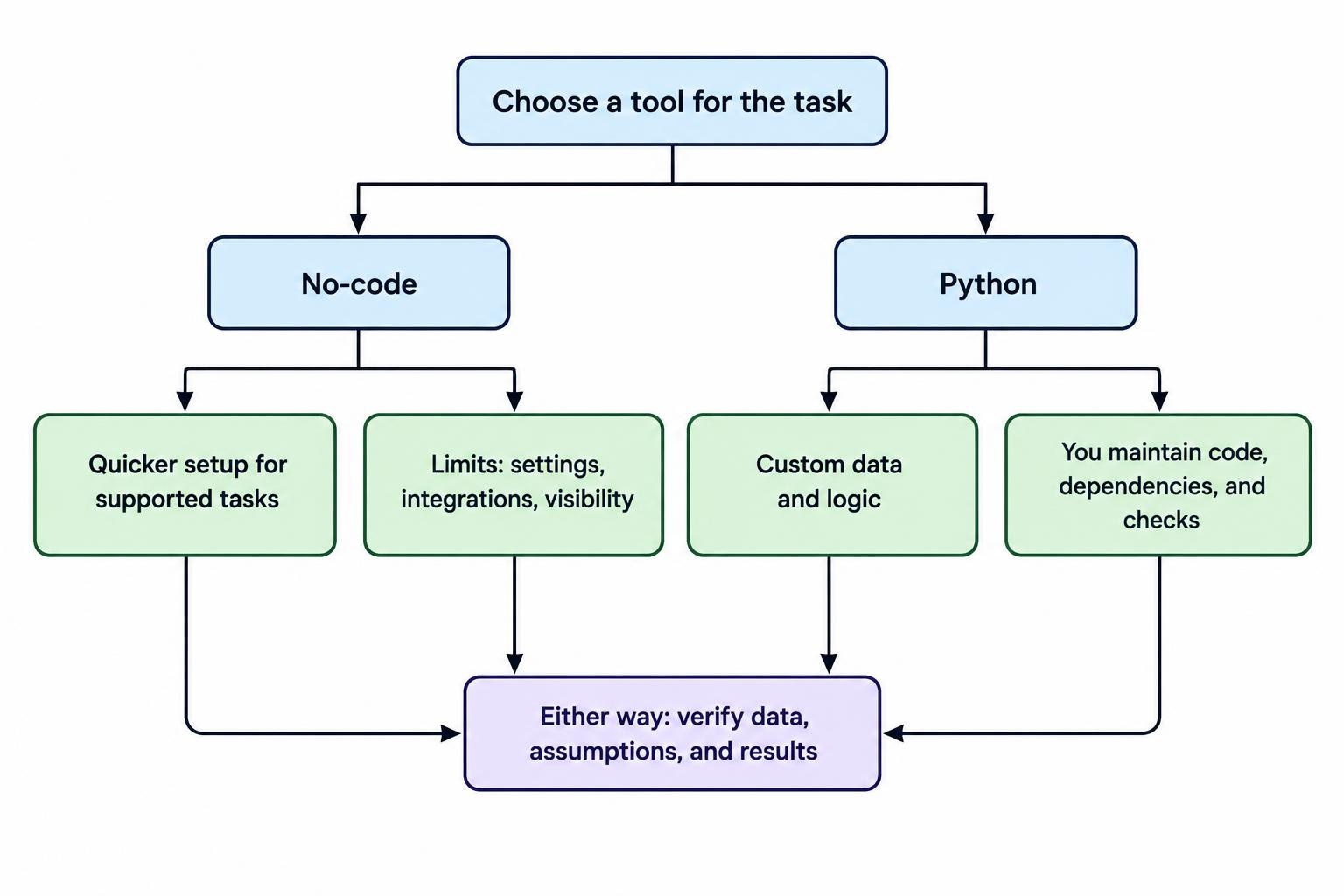
No-code AI trading tools let you screen markets, test rules, or build simple automations through menus and visual workflows. Python gives you more control over the data, calculations, models, and execution logic, but you must build or maintain those parts yourself. The practical choice is not “easy versus advanced.” It is whether the time saved by a ready-made tool outweighs the limits it imposes, and whether you can safely manage code when you need more control.
Many retail traders do not need to choose one approach forever. A no-code tool can help test an idea or organize research, while Python can take over when a task needs repeatable data handling or custom analysis. Either route can produce weak results if the market data is poor, the test is misleading, or the trading rules are vague. Compare the work each option lets you do, the work it hides, and the responsibilities that remain yours.
What counts as a no-code AI trading tool?
“No-code” usually means you can configure a tool without writing a conventional program. The interface may offer strategy blocks, prompts, filters, chart controls, templates, or a workflow builder. Some tools focus on research and signals. Others connect conditions to alerts or orders. A product may also use code behind the interface; the point is that the user works mainly through settings rather than writing and maintaining that code.
AI is a separate question. A visual strategy builder that follows fixed rules is not necessarily an AI system. A service may use machine learning to rank signals, generate text, classify news, or help write rules, but that does not tell you how it was trained or how well it works. Check what the feature actually does, what inputs it uses, and whether you can inspect the result. For a broader map of these products, see AI trading tools and platforms.
Python is a general purpose programming language. A trader can use it to load and clean data, calculate indicators, run tests, train models, create reports, or connect software components. Libraries add functions for particular tasks. The pandas project, for example, provides data structures and tools for working with tabular data and time series. That flexibility comes with a trade: you choose how the pieces fit, and you are responsible for checking that they fit correctly.
No-code tools vs Python at a glance
| Factor | No-code tools | Python |
|---|---|---|
| Getting started | Often quicker for supported tasks; setup depends on the product. | Requires installing or accessing a coding environment and learning the language. |
| Control | Bound by available settings, templates, data, and integrations. | Lets you define custom data handling and logic, subject to your skills and libraries. |
| Transparency | May expose only selected settings or summaries of the process. | Code can make the process inspectable, but only if it is written clearly and documented. |
| Maintenance | The provider manages parts of the service; you still need to check changes and outputs. | You manage dependencies, errors, data pipelines, testing, and updates. |
| Portability | Workflows may depend on the provider’s format and integrations. | Code can be moved, though it may rely on particular libraries, data vendors, or APIs. |
| Typical fit | Prototyping, routine screening, and supported workflows. | Custom research, repeatable analysis, and processes that need finer control. |
When no-code is the sensible starting point
A no-code tool can be a good fit when your task is narrow and the platform supports it directly. You might want to screen a watchlist against a handful of conditions, receive an alert when they line up, or compare a small set of fixed rules. A graphical interface can make it easier to see what you configured, particularly when you are still defining the question you want a trading system to answer.
It also makes sense when you have little coding experience and want to learn the research process before taking on software maintenance. You still need to understand the trading rules, the data, and the test results; the interface does not supply those skills for you. If the goal is to turn a rough idea into a workflow, a visual tool may help expose missing decisions: which market to check, when a signal becomes valid, and what should happen when data is missing.
But speed at setup is only useful if the tool’s limits match the task. Look closely at the assets and time intervals it supports, how it handles historical data, whether you can account for fees and slippage, and what happens when an alert or connection fails. Compare the actual functions and responsibilities of managed bots, broker tools, and open-source software before treating them as interchangeable. They are not.
When Python earns its extra work
Python becomes useful when a workflow needs rules that a visual editor cannot express, or when you want to inspect and change each step. You may need to merge price data from separate files, create a feature from a particular lookback window, apply a model to a defined sample, or produce the same report after each new data update. Python code can make those steps repeatable. It cannot make them correct by itself.
Data work is one common reason traders move to code. The pandas package overview describes tools for working with labeled and tabular data, including time series. In a trading project, code can help identify missing timestamps, align columns, calculate returns, and save the exact transformations used. These tasks still require careful checks: a quiet mismatch between time zones, instruments, or price fields can distort a backtest without triggering an obvious error.
Custom research is another reason. Python may let you compare alternative rules, build a repeatable report, or test a feature that a hosted platform does not offer. That freedom is useful when the question is precise. It is less helpful when the project keeps expanding because every new library, model, and indicator looks tempting. More machinery can mean more ways to make an unnoticed mistake.
Before making that move, assess the skills needed to read, test, and maintain a project, not just write a first draft. A practical review of the skills used in AI trading can help identify gaps. If the work you need is mostly supported by a tool you already understand, writing code may add effort without improving the decision.
The real cost includes time and upkeep
A no-code product may charge a subscription, limit features by plan, or require separate payments for data or execution connections. A Python workflow may use free software and still carry costs for market data, computing, storage, hosting, or developer time. “Free” describes a price tag, not the total cost of running a reliable process. Estimate costs for the actual workflow, including the time it takes to investigate errors and update the system.
There is a maintenance difference, too. A hosted product may be updated by its provider, but an update can change menus, data coverage, or the behavior of an integration. With Python, you control the project files, but a change to a library, data source, or API can break part of the workflow. Neither approach is maintenance-free. A closer breakdown of AI trading software, data, computing, and execution costs can help keep the comparison grounded.
For either choice, estimate the full workload. Include the hours required to learn the tool, check its output, document your process, and recover when something goes wrong. A platform that costs less in cash may demand more manual work. A custom script that saves repetitive work may be a poor trade if it takes weeks to build and is difficult to verify.
Check how much of the process you can inspect
Visibility matters because a neat chart or a confident AI explanation can hide assumptions. Before relying on a no-code result, find out what data was used, which settings are active, how signals are generated, and whether the test includes realistic trading costs. If the platform shows only a single performance number, ask what sits behind it. If the answer is not available, treat the result as a prompt for further checking, not proof that a strategy is ready.
Code is inspectable in principle, not automatically transparent in practice. A long notebook with undocumented cells can be harder to audit than a clear platform report. Code may also contain mistakes that produce plausible outputs. Keep a record of data sources, date ranges, assumptions, and changes. Run simple checks on sample rows and intermediate calculations before trusting an end result.
Backtests deserve particular care. A strategy can appear successful when it uses information that would not have been available at the time, or when the test leaves out trading costs. Those risks apply whether the test runs in a visual platform or a Python script. Learn how to prepare historical market data and how to separate training, validation, and test sets before treating a strong result as useful evidence.
A hybrid route can keep the work manageable
These choices are not mutually exclusive. A trader might use a no-code platform to scan a watchlist, then export results for independent checks. Another might prototype a rule in a spreadsheet or visual builder, then rewrite it in Python after the logic stops changing. A third may use Python for research and a separate platform for alerts. The right split depends on whether the tools exchange data reliably and whether the handoffs are clear.
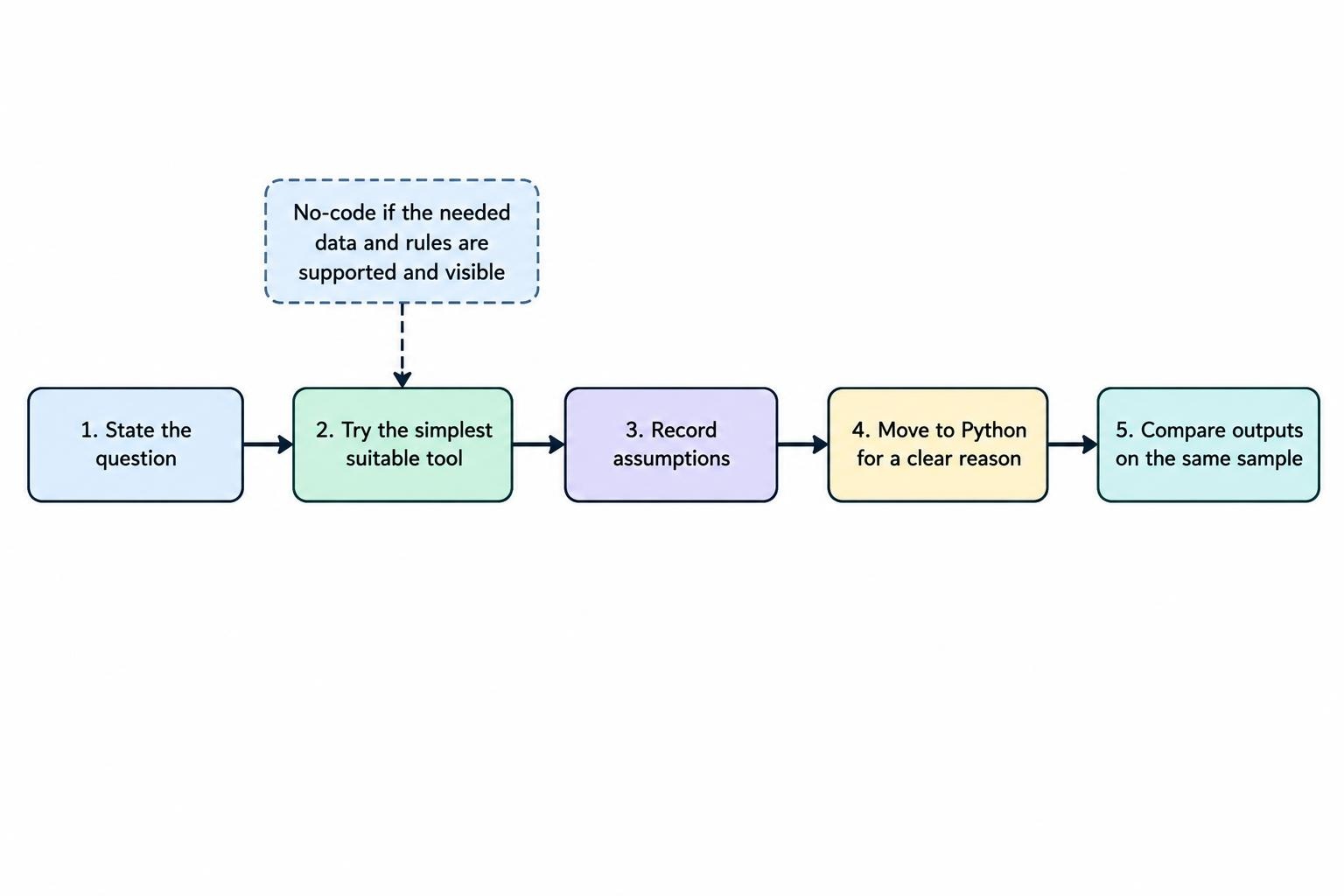
A staged workflow can prevent both premature coding and blind reliance on a platform:
- State the question. Define what you want to measure or test, which market and time frame matter, and what would count as a useful result.
- Try the simplest tool that can answer it. Use no-code if the required data and rules are available and visible.
- Record the assumptions. Keep the data range, settings, costs, and rule changes in one place.
- Move to Python for a clear reason. That reason might be a missing feature, a need for repeatable analysis, or a data task that the platform cannot handle.
- Test the handoff. Compare outputs on the same small sample before relying on the new workflow.
For a fuller process that connects research, testing, execution, and review, see the guide to building an AI-assisted trading workflow. The point is to keep each step understandable, even when different tools handle different jobs.
Questions to ask before committing
Before paying for a no-code product, confirm that it supports the market, data interval, and rules you need. Find out whether you can export your settings and results, how often data updates, what permissions an integration requests, and what happens if service is interrupted. A feature list is not enough. If a tool promises hands-off trading, clarify what you must monitor and what controls you retain.
Before building in Python, ask whether you can maintain the result after the first version works. Can you explain each transformation? Can you repeat the analysis from a clean start? Do you know how to handle missing data, failed requests, and changed dependencies? If not, keep the project small or learn those basics before linking code to live orders. Guidance on evaluating an AI trading platform before paying is useful for checking claims and practical limits across products.
Be wary of any service that treats AI as proof of performance or promises guaranteed trading profits. In a U.S. enforcement action, the SEC alleged that operators promoted supposed AI trading bots and guaranteed profits, while the bots did not exist. The allegation is a reminder to verify what a service actually does; it is not evidence that every AI tool is fraudulent. Read the SEC litigation release on alleged fake AI trading bots for the details of that case.
How to choose for your situation
Choose no-code if your task fits the tool’s supported features, you can inspect its assumptions, and you prefer to spend time on the trading question rather than software maintenance. Choose Python if you need custom data handling or logic, and can learn enough to test and maintain it. If neither description fits neatly, start with a small no-code experiment and note what it cannot do. That gives you a concrete reason to learn Python instead of treating code as a badge of seriousness.
Whichever route you take, separate research from execution while you are still checking the process. A signal that looks sound in a chart is not a validated strategy, and a successful test does not guarantee future results. Keep the system understandable, test it on data it was not built around, and do not give software more authority than you can monitor.