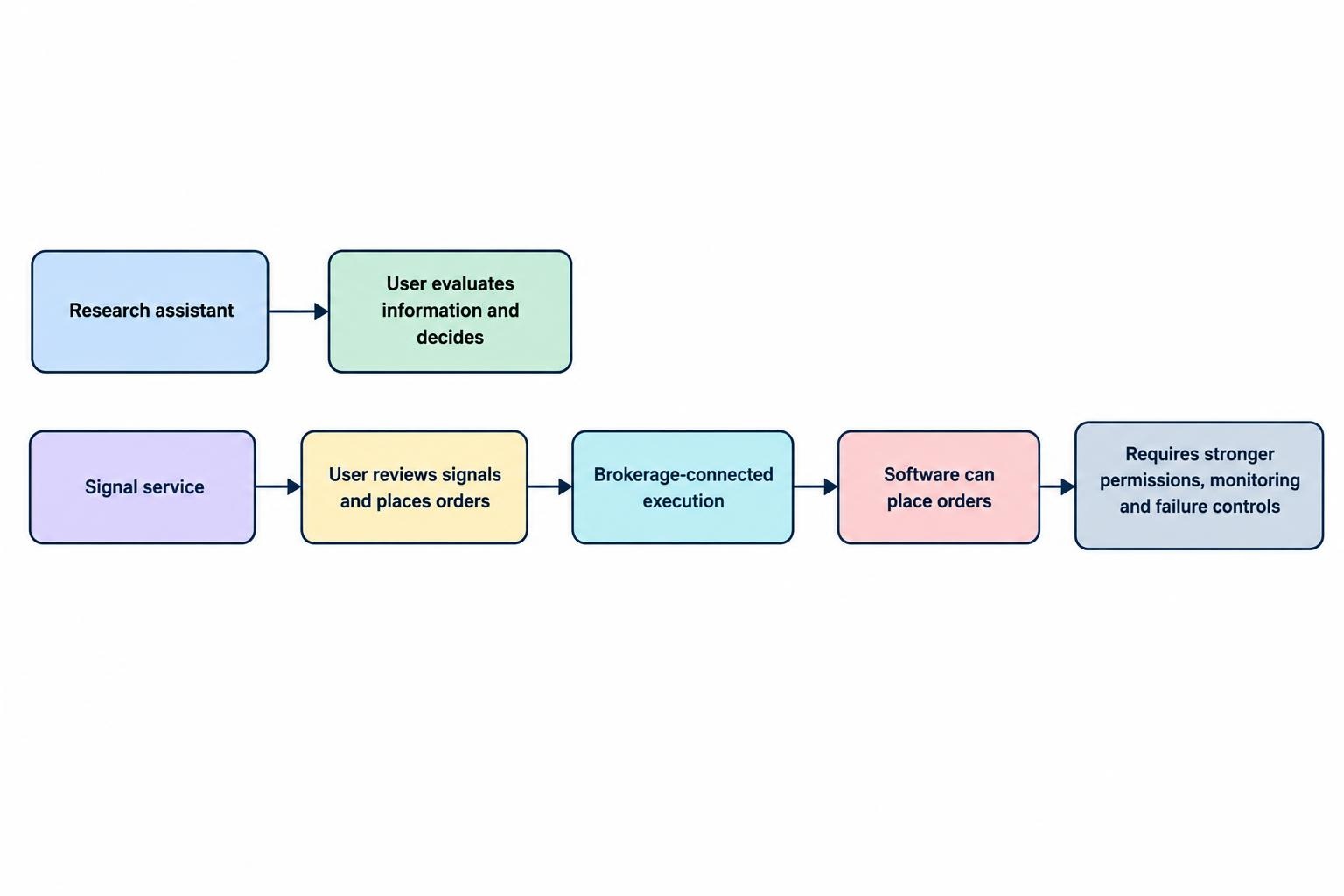
An AI trading platform can mean a research assistant, a signal generator, a backtesting service, or software that places orders in a brokerage account. Those products do different jobs and carry different risks. Before paying, decide what task you want the platform to perform, then check whether its data, evidence, controls and costs fit that task. A slick dashboard or an “AI powered” label tells you little about whether a tool can help with your process. This guide sets out practical checks for assessing products in the broader AI trading tools and platforms category, without assuming that one type of service is suitable for every trader.
Define what you need the platform to do
Write down the job before comparing features. You might want software to screen a watchlist, summarize news, help test a rule based strategy, analyze a trading journal, or send orders automatically. These are separate jobs. A tool that summarizes market news is not automatically a reliable source of entry signals, and a backtesting interface does not prove that a strategy will perform the same way in live markets. Some products combine several functions, but the sales page should not blur the difference between analysis and execution.
Match the product to your experience and working method. If you want prebuilt strategies and a visual interface, compare that offer with the tradeoffs described in managed bots, broker tools and open source software. If you already code, check whether the platform gives you access to the inputs and outputs you need. A no code screen can save setup time, while a Python workflow may provide more control over data and tests; the distinction is covered in no code AI trading tools versus building with Python.
Be precise about the level of control you are willing to hand over. A research assistant that produces text leaves decisions with you. A signal service may shape decisions, even if you place orders manually. A system connected to a brokerage account can act before you notice a problem. These products should not be judged by the same checklist: each step toward automated execution calls for stronger permissions, monitoring and failure controls.
Check what the provider means by “AI”
Ask the provider to explain what the software does in plain terms. Does it use a language model to summarize text, a statistical model to score market data, a rules based system to trigger alerts, or some combination? What data goes in, what result comes out, and what decisions remain yours? The company does not need to publish proprietary code, but it should be able to describe the product’s purpose and limits without leaning on buzzwords.
Look for a clear account of the model’s role, data sources and update process. If a platform says it predicts price moves, ask what it predicts: a price level, a return over a defined period, the chance of a move exceeding a threshold, or something else. “The AI finds opportunities” is too vague to evaluate. A credible explanation names the task and the conditions where its output should not be trusted, such as missing data, unusual volatility or an unsupported asset class.
Do not treat a chatbot’s confident answer as proof that the underlying analysis is sound. Generative AI can produce incorrect or outdated information, and fluent writing can hide a weak or missing evidence trail. For research tools, check whether market claims link to original documents or data that you can inspect. The SEC, NASAA and FINRA warn investors not to rely solely on AI generated information when making investment decisions, since it can be inaccurate, incomplete or misleading. Their investor alert on AI and investment fraud recommends verifying the underlying sources.
Ask for evidence, not a headline return
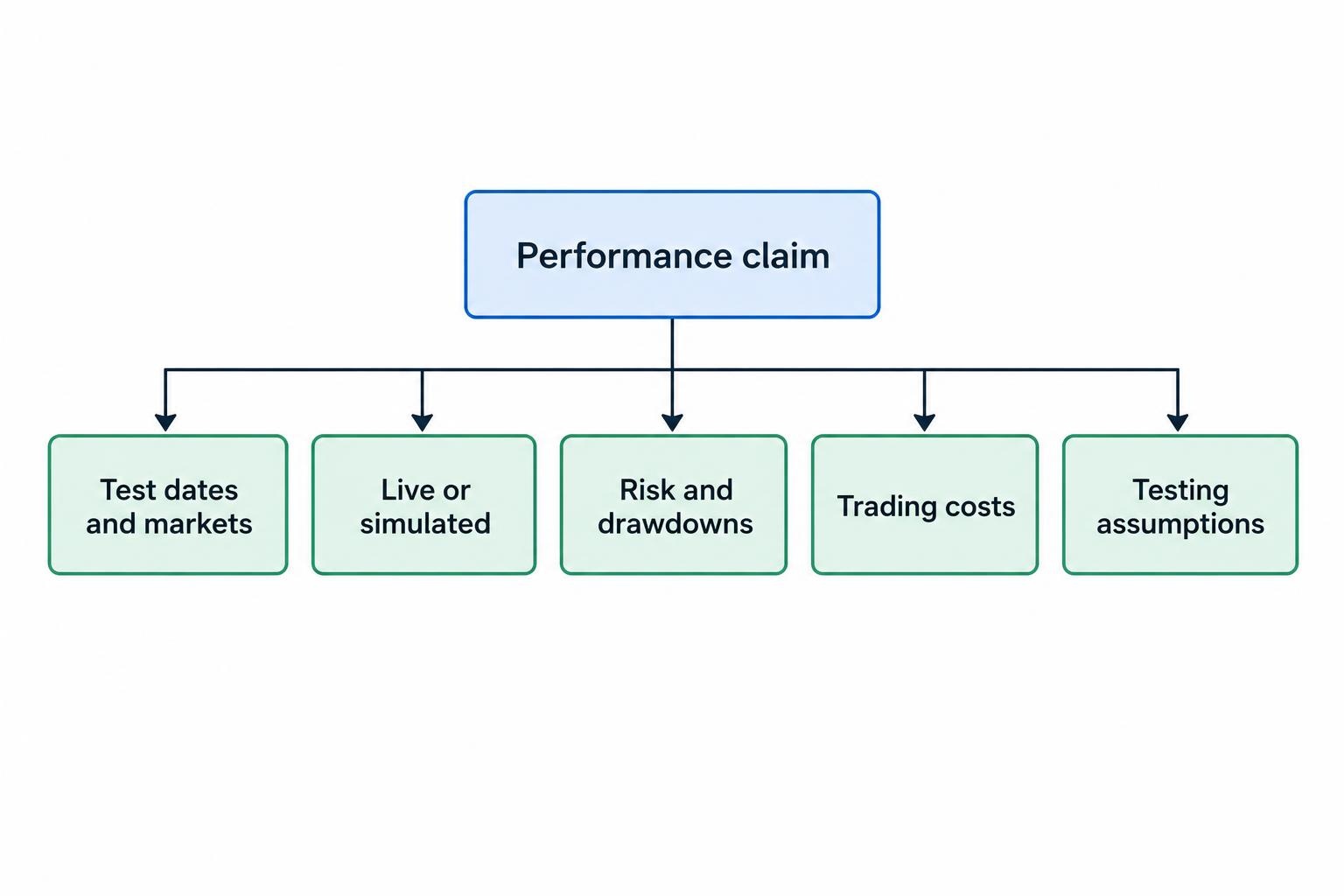
Performance claims need enough detail to reproduce or scrutinize them. Ask what dates were tested, which assets and markets were included, whether the results are live or simulated, and whether the platform’s current version produced them. Find out if the published record includes losing trades, inactive periods and failed strategies, or only selected examples. A large return figure without context cannot show how much risk was taken to produce it.
Check whether a backtest used information that would have been available at the time of each simulated decision. Future information leaking into a test can make a strategy appear more successful than it would have been in real use. Results can also be weakened by testing many variations and reporting only the best one. A platform should let you inspect the assumptions behind its results, rather than presenting a polished equity curve with no usable detail. Review the product’s testing method alongside guidance on training, validation and test sets for financial time series.
Look beyond win rate. A strategy can win often and still lose money if its losing trades are much larger than its winners. Ask for measures that show drawdowns, variability, exposure and the number of trades, and check whether results are before or after trading costs. Performance in a historical test is evidence about that test, not a promise about future results. FINRA warns that auto trading advertisements can present vague or unverified claims, highlight selected profitable trades, or imply that AI makes returns predictable. Its guidance on auto trading services identifies guaranteed returns and unsupported performance claims as warning signs.
Inspect data quality and market coverage
Find out which instruments, exchanges, time frames and data types the platform supports. A tool built around end of day stock prices may not be appropriate for intraday futures signals. Confirm whether it uses live, delayed or historical data, and whether news or fundamental data carries a separate license or fee. “Real time” should be defined in practical terms: ask about update frequency, typical delays and what happens during a feed interruption.
Ask how the platform handles missing observations, corporate actions, time zones, market holidays and changes in ticker symbols. These details can affect the output and make results from different tools hard to compare. If you cannot inspect the source data or understand how it is cleaned, treat any generated signal as an input to verify, not a fact to trade. For broader research, use a workflow that keeps source material and decisions reviewable; the guide to using AI assistants to research markets and check trading ideas covers that kind of use.
Coverage claims can be misleading when “supports 10,000 assets” does not mean the same thing across the list. Some instruments may have only sparse or delayed data, while others have richer histories. Ask whether your chosen market has enough usable observations for the time frame and method you intend to test. Then confirm that the platform’s displayed history matches the data it actually used in simulations.
Review backtesting and paper trading controls
A useful testing environment makes assumptions visible. Check whether you can choose a test period, separate development data from evaluation data, and compare results across different market conditions. Find out whether the platform records each test’s configuration so that you can repeat it later. If a tool lets you adjust many settings but does not preserve what changed, it may be difficult to tell whether a better result reflects a stronger idea or a lucky configuration.
Trading costs matter. Check whether the platform can account for commissions, spreads, slippage and any financing or borrowing charges relevant to the strategy. If costs are absent or fixed at implausibly low values, a simulated result may not represent what execution would cost. Read the assumptions and compare them with the instruments and account you would actually use. See how fees, spreads, slippage and financing costs affect backtests.
Paper trading is useful for checking whether signals arrive when expected and whether the system behaves as configured. It does not establish that a strategy will earn money live. Simulated orders may not experience the same fills, delays or liquidity constraints as real orders. Before paying for a long subscription, find out whether the platform offers a trial or a way to test with sample data, and decide what you want that test to establish. A structured research, testing and review process is outlined in building an AI assisted trading workflow.
Understand how it connects to your account
For any product that connects to a brokerage account, identify exactly what the connection can do. Read the permission screen, check whether access is read only or can place orders, and avoid sharing a brokerage username and password with a third party. Prefer access methods that let you restrict permissions and revoke them. Confirm how to disconnect the service and what happens to any stored credentials or account data afterward.
Before enabling order placement, check how the platform sets position size, handles rejected orders and responds to a dropped connection. Can you set a maximum order size or daily loss limit? Is there a way to pause trading quickly? Does the system report filled orders and reconcile them with the account, or does it assume every submitted order was filled? These are operational questions, not small print. The detailed mechanics of connecting a trading system to a broker API deserve attention before live access is granted.
Check whether the provider explains what it does during outages, erroneous signals or unexpected orders. A platform should give you a way to see what happened and stop further activity while you investigate. FINRA highlights risks tied to third party auto trading, including potentially unsuitable trades, account access and difficulty noticing activity before losses occur. Keep independent oversight of the account even if the software advertises hands off operation.
Read the privacy, security and service terms
Determine what information the provider collects: account balances, positions, order history, personal details, prompts, uploaded files or API credentials. Then check where that information is stored, who can access it, how long it is retained and whether it may be used to train models or shared with other companies. A privacy policy that says data may be used to improve services leaves important questions open; look for a clear setting or written answer on your intended use.
Review security features before connecting an account. Look for multi factor authentication, permission controls, a process for reporting security incidents and a way to revoke access without relying on a support agent. Read the terms for account deletion and data export as well. If the service is a small or new provider, consider what happens if it closes, loses access to a data supplier or changes the product. These checks matter because a platform depends on its own software and often third party data or services. NIST’s AI Risk Management Framework treats third party systems, data and ongoing monitoring as parts of risk management; the NIST AI RMF Core is a useful reference for those principles.
Calculate the full cost before subscribing
Compare the total cost, not only the advertised monthly price. Add data subscriptions, exchange fees, API or order charges, usage limits, account minimums and any extra charge for live execution. Check whether the plan caps queries, strategies, symbols, historical data or automated trades. A low entry price can become poor value if core features require an upgrade or if the plan restricts the tests you need to run.
Look at cancellation terms, renewal dates, refunds and whether the provider makes it easy to export your work. If a trial requires payment details, note when billing begins and how to cancel. Cost should be judged against a defined use: a research tool used occasionally has a different value from a service that replaces data, analysis and execution tools. The cost categories to compare are set out in the cost of AI trading software, market data, computing and execution.
Check the provider and its claims
Identify the legal company behind the product, its contact details and the entity that handles payments. Search for clear service terms, privacy disclosures and a record of product updates. Testimonials, social media screenshots and celebrity endorsements are not substitutes for evidence. Be especially wary if a salesperson pressures you to deposit funds quickly, promises fixed returns, or claims the system cannot lose. AI wording does not remove ordinary market risk.
If the service provides investment advice, manages money or sends trades to your account, check what registrations or permissions may apply to the service and the provider. Requirements depend on the product and activity, so do not assume that a software label settles the question. In the United States, use official tools such as Investor.gov’s professional search or FINRA BrokerCheck where relevant, and verify any claimed partnership directly with the named firm. The SEC, NASAA and FINRA have warned that some unregistered platforms use AI claims to make investment schemes appear credible.
A provider should answer reasonable questions about its product without guaranteeing performance. That does not mean every proprietary detail must be public. It does mean you should be able to understand the service’s intended use, the evidence offered, the data it relies on, how account access works, what it costs and how to stop it. If those basics remain unclear after you ask, do not pay simply because the dashboard looks polished.
Use a short pre purchase check
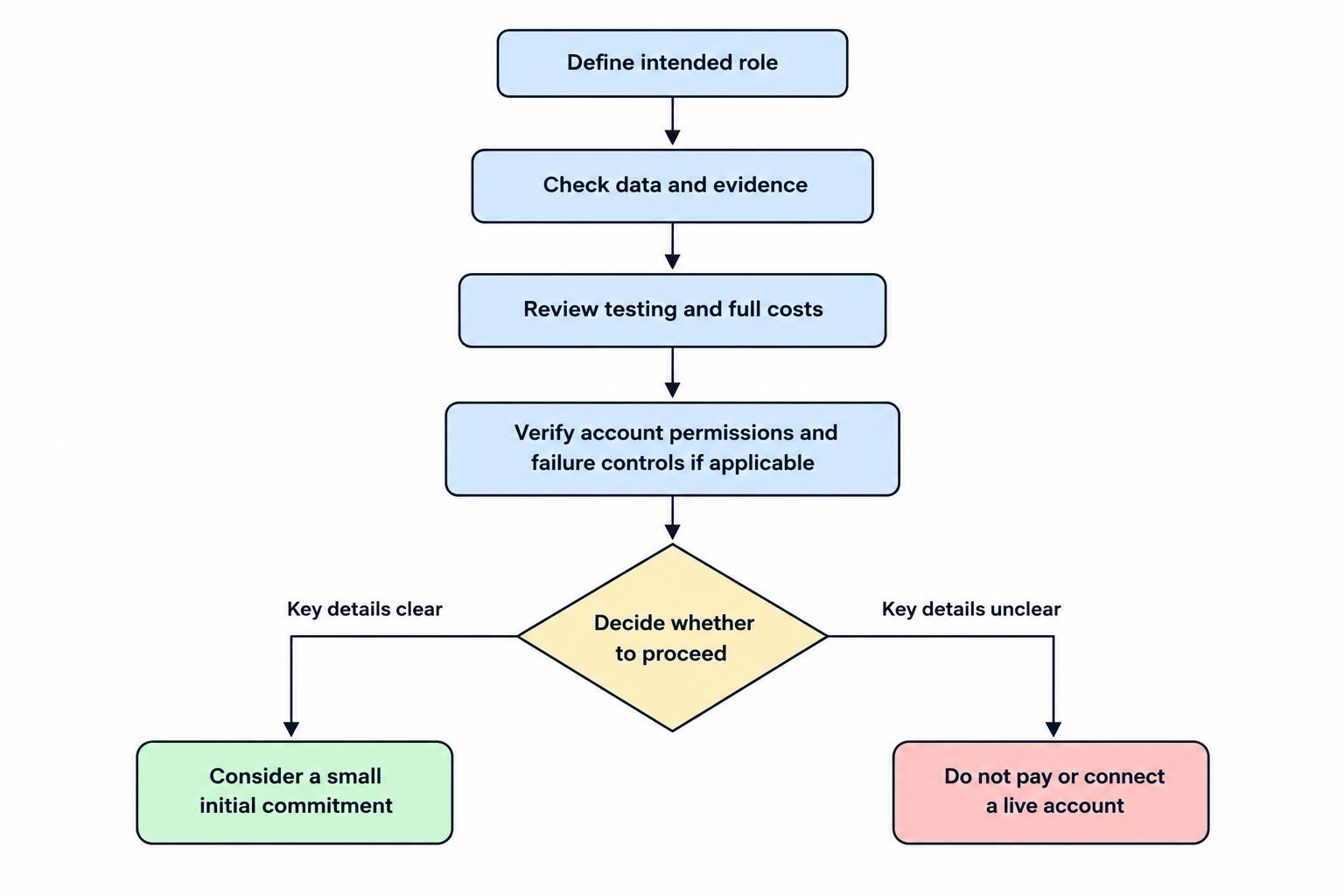
Before entering payment details, write down the product’s intended role and confirm it matches the plan you made at the start. Check that its markets and data fit your use, that performance evidence includes understandable assumptions, and that testing accounts for costs. Verify the subscription’s full price and cancellation process. If the product connects to a brokerage account, confirm the exact permissions and the steps for stopping activity. A trial should test these practical points, not just whether the interface is easy to click through.
Keep the first commitment small enough that you can leave without pressure. Do not upload sensitive records or connect a live account until you understand how information and permissions are handled. If a tool cannot provide clear answers about what it does, how it was evaluated or what happens when it fails, choose a more transparent option—or use a simpler process that you can check yourself.