AI trading tools cover several different jobs. Some summarize financial news, others screen markets, generate chart indicators, test rules against historical data or send orders through an execution system. A product may advertise all of these, but that does not mean it performs each job well—or that its output is ready to trade. Choose software by the task you need done, the data it uses and the checks you can apply to its results.
For most retail traders, AI works best as an assistant inside a controlled process. It can speed up research or help turn a written rule into a script; you still need to verify the inputs, test the result and decide whether a trade fits your plan. The difference between an assistant and an automated system matters: one suggests or organizes work, while the other may act on your account. A useful starting point is to separate tools by function, then compare how much control each gives you.
What counts as an AI trading tool?
The label can describe a general-purpose chatbot, a charting platform with AI features, a machine learning library or a service that sends trades to an account. These products are not interchangeable. A chatbot can help organize a research question without having current market data. A charting tool may work with live or delayed quotes, but only within the instruments and feeds it supports. A model development environment gives you more control, but also asks you to handle data preparation, testing and maintenance.
Before comparing products, decide what task you want to improve. If your problem is sorting a large watchlist, a screener may be useful. If you need to review announcements, a research assistant may help organize documents. If you want a custom indicator, a scripting tool could save time. Traders comparing these options can use this guide to managed bots, broker tools and open-source software to distinguish software categories before focusing on individual features.
| Tool type | Typical use | What to verify |
|---|---|---|
| General AI assistant | Summarize supplied material, explain concepts, draft research questions or help review a trading journal. | Whether the answer uses current, verifiable data; whether uploaded material is handled appropriately. |
| Charting and screening platform | Filter symbols, display indicators, mark chart levels or create alerts. | Data coverage, time stamps, alert conditions and whether the AI can change a chart or setting. |
| Code and model tools | Build indicators, analyze datasets, test hypotheses or create machine learning models. | Data quality, reproducibility, test design and the skill needed to maintain the work. |
| Automation or bot service | Turn signals into orders, sometimes with little manual input. | Account permissions, order controls, monitoring, fees and the provider’s identity. |
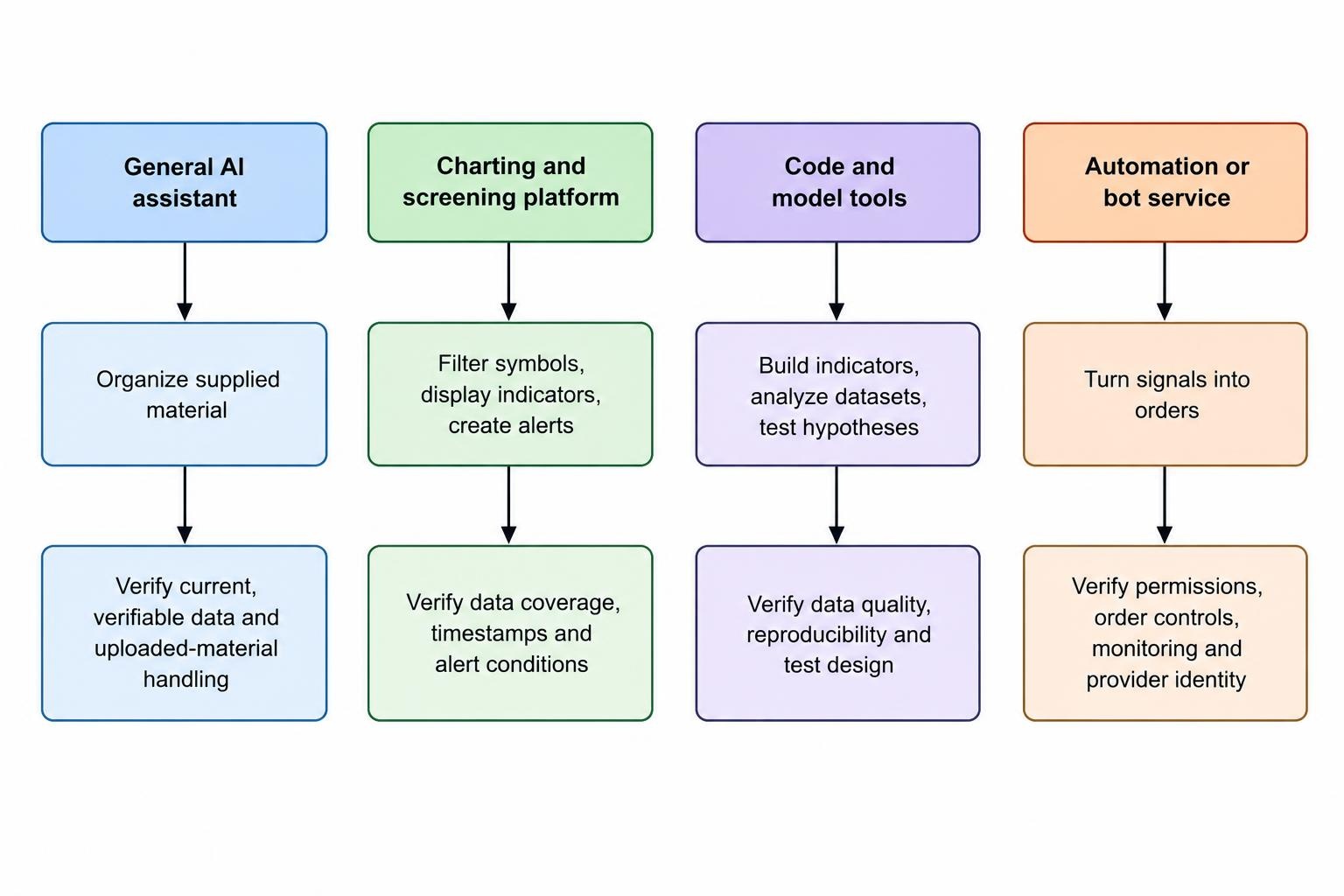
Common types of AI trading platforms
AI assistants for research and writing
A general-purpose assistant can help turn a broad question into a checklist, summarize a document you provide or explain what a piece of code is intended to do. It may also help compare two versions of a trading rule, provided you give it clear definitions. This can save time, especially when the work is administrative rather than predictive. It should not be treated as a dependable source of live prices, market news or company figures unless the product identifies the data source and you can confirm the result independently.
Useful prompts are narrow and testable. Ask the assistant to extract a company’s reported revenue and publication date from a supplied filing, then check the filing yourself. Ask it to list the assumptions in a proposed trading rule, rather than declaring whether the rule will make money. For a more detailed look at this kind of work, see using AI assistants to research markets and check trading ideas.
Charting, screening and signal tools
These platforms combine market data with visual analysis, screeners, indicators and alerts. AI features may let users request chart changes in ordinary language, generate an indicator or summarize selected information. TradingView, for example, documents an AI Copilot that can work with chart elements and platform data; its stated limits include the possibility of incorrect or outdated answers. Its AI Copilot feature description and limitations offer a concrete example of the distinction between convenience features and a guarantee of correct analysis.
Generated chart markings are still interpretations. A pattern label does not prove that a setup is valid, and an alert only monitors the condition you configure. Check the symbol, timeframe, session settings and exact trigger before relying on an alert. Review any generated indicator in the editor and compare its calculations with the rule you intended. Traders assessing visual analysis can read more about AI chart analysis, context and limitations.
Code, data and machine learning tools
Programming environments and machine learning libraries are suited to traders who want to work with their own data and rules. They can support tasks such as cleaning datasets, calculating features, comparing model outputs or running repeatable tests. This flexibility comes with responsibility: you must know what the data represents, how it is timestamped and whether the test procedure accidentally uses information that would not have been available at the time of a trade.
AI coding assistants can draft or explain scripts, but working code is not necessarily correct trading logic. It may compile while using an unintended entry condition, mishandling missing data or ignoring realistic execution costs. TradingView describes Pine Script as a language for custom indicators and strategies, including simulated trade reports; its Pine Script documentation explains what those scripts can do. Treat a generated script as a first draft. Read it, test it and compare its outputs with a simple manual example.
Automation and trading bots
Automation can connect signals to order placement, but the added convenience also raises the cost of a mistake. A faulty rule can send repeated or unintended orders faster than a person can react. Some products only generate alerts; others may request permission to access an account or transmit instructions to an execution service. Find out exactly which actions the software can take and whether you can restrict its permissions, set order limits and stop it quickly.
Do not hand over account credentials to an unknown provider or assume a polished dashboard proves that a service is legitimate. FINRA warns that some auto-trading services make unsupported performance claims or exaggerate their use of AI, and recommends checking the provider and monitoring account activity. Its investor alert on auto-trading services outlines risks that apply when evaluating a service that can act on an account. Further practical considerations are covered in the guide to checking claims about win rates, backtests and guaranteed returns.
How to evaluate an AI trading platform
Start with a plain description of the task. “Find possible earnings announcement dates for this watchlist” is clearer than “find profitable trades.” Then check whether the product identifies the data behind its answer, shows when that data was updated and lets you inspect or export the relevant output. If a platform does not explain what it uses, treat its claims as unverified. A feature list can describe what the software offers, but it cannot establish that a strategy has an edge.
Next, look at control and auditability. Can you review the inputs, rules and settings? Does the tool record what it changed, when an alert fired or why an order was sent? Can you test a change without immediately connecting it to a live account? For automated services, check whether you can revoke access and place limits on activity. A platform that makes it hard to inspect its decisions may be a poor fit, even if the interface looks simple. Use this checklist alongside the fuller guide to evaluating an AI trading platform before paying.
Cost matters too. A subscription may not include every market data feed, add-on, usage tier or automation feature. If you need cloud computing or paid datasets, those costs can sit outside the platform fee. Compare the full cost with the task’s value, not with the most optimistic return shown in an advertisement. The guide to AI trading software, data, computing and execution costs covers the expenses that can be easy to overlook.
Match the tool to your skills and workflow
A no-code platform may be practical for screening, alerts and straightforward chart tasks. A coding environment gives greater control over data processing and testing, but it also requires you to review code and maintain the system. Neither option removes the need to understand the trading rule. Compare the trade-off in no-code AI trading tools and Python development before paying for features you may not use.
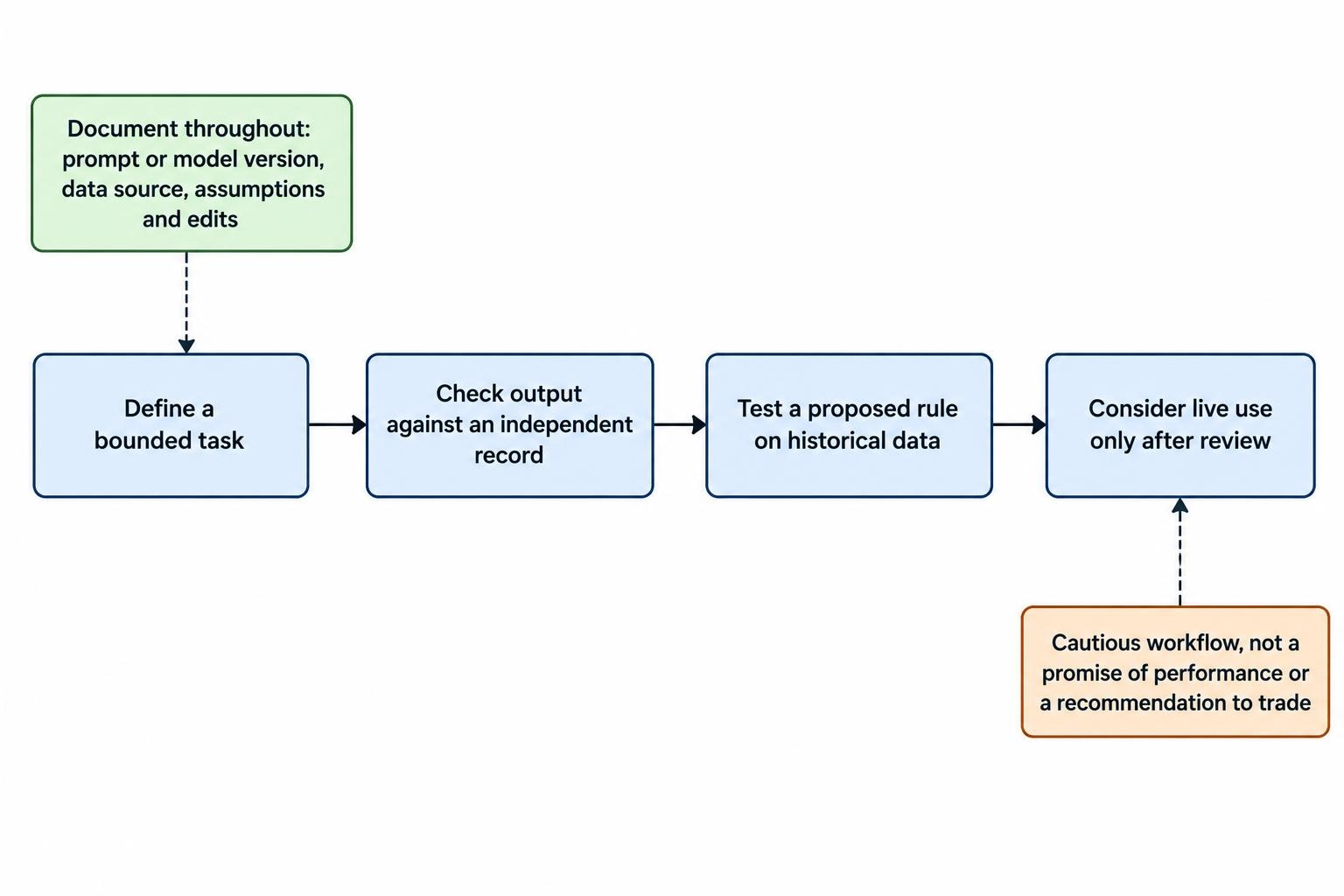
One workable process is to use AI for a bounded task, check the output against an independent record, then test any proposed rule on historical data before considering live use. Keep a record of the prompt or model version, data source, assumptions and edits. If the tool changes its output when you repeat the same request, that variability may matter for a process that needs repeatable decisions. A fuller sequence from research through review is described in an AI-assisted trading workflow.
Privacy and account access
Market research can involve sensitive material: account statements, position sizes, proprietary notes or personal financial details. Before uploading information, read the tool’s data settings and retention terms. Remove account identifiers and private details that are not needed for the task. For ChatGPT personal workspaces, OpenAI provides a setting to control whether new conversations are used to improve its models; the ChatGPT data controls documentation explains the available setting and notes that controls vary by account and workspace.
Separate research access from trading access wherever possible. A tool that only reads a file or produces a signal does not need permission to place orders. If an integration requests account access, understand the permissions before approving it, use the narrowest available access and know how to revoke it. For API-connected setups, review the practical guidance on protecting broker API keys and restricting trading permissions.
Signs a platform deserves extra scrutiny
Be wary of promises of guaranteed returns, unusually high win rates without verifiable records, vague claims about a proprietary AI model, or pressure to deposit funds quickly. A backtest screenshot alone cannot show how the test was designed, whether costs were included or whether the displayed period was selected after the fact. Ask what the system does, what data it uses, how results were measured and what can go wrong. If the provider cannot answer in plain language, do not let the AI label do the explaining for them.
Choose the simplest tool that supports a task you can define and verify. A screener, research assistant or code editor may be enough; a black-box bot that can trade automatically is a very different commitment. Test software without live account permissions first, check its outputs yourself and keep control over any final trading decision.