A trading alert is a message that a condition has been met. A webhook is one way to deliver that message to another system, usually through an HTTP request. Together, they can connect an AI model or trading rule to software that checks the signal, applies controls and, if allowed, prepares or submits an order. The connection is useful, but it does not make a signal reliable or an order safe. A delayed, duplicated or malformed message can still cause trouble, and a correct signal can arrive when the market has already moved.
A safer design treats the alert as the start of a controlled process, not as an order by itself. The receiving system should verify the message, check the current account and market state, enforce trade limits, then record what happened. A person can review the signal before execution, or the system can act automatically within strict limits. Either way, clear boundaries matter. This article explains the steps between a model’s output and an order, and the checks that help prevent a routine alert from turning into an avoidable trading error.
What an alert and webhook do
An alert fires when a defined condition is met: a price crosses a level, an indicator reaches a value, or a model produces a signal that passes a rule. The alerting service can display a notification, send an email or deliver a webhook. A webhook is usually an HTTP POST request sent to a URL controlled by the receiving application. Its body contains the alert message, often as JSON. The recipient then decides what to do with the message; the webhook itself does not place an order.
That distinction matters. An alerting service may know that a condition occurred, but it may not know whether the account already has a position, whether an earlier order is still working, or whether the trading system is currently disabled. The receiving application can check those details before taking action. If you are designing the broader system, see the guide to automating AI trading and managing execution for how this alert stage fits into the rest of the process.
TradingView, for example, can send a POST request to a webhook URL when an alert triggers. Its instructions note that a valid JSON message is sent with an application/json content type, and warn against putting passwords or login credentials in the request body. Delivery can fail, so the alert log should be checked during setup and monitoring. These details are platform specific: check the current documentation for the alerting service you use, rather than assuming every webhook handles messages in the same way. TradingView’s webhook setup guidance describes its request format and delivery limitations.
Choose how much authority the alert has
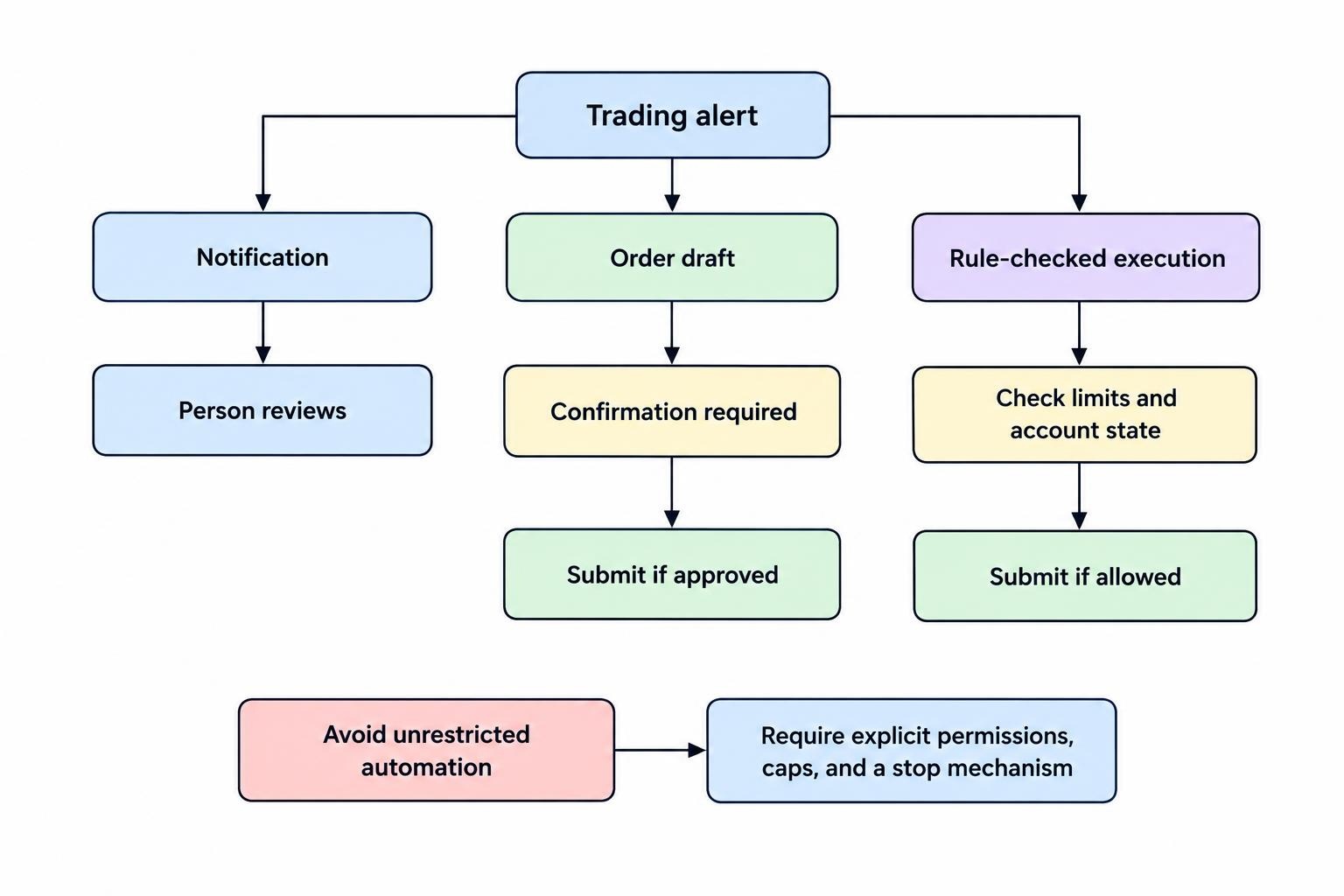
There are several sensible ways to use a signal. At the lowest level, the webhook can create a notification for a person to assess. It can also create a draft order that requires confirmation, or send a signal to a separate system that performs risk checks and submits an order. Fully automatic execution is possible, but it gives the receiving system more authority and makes failure controls more important. Start with the least authority that meets the purpose. A model that helps identify candidates does not need permission to change account settings or place unrestricted orders.
| Alert use | What happens after the signal | Main control to consider |
|---|---|---|
| Notification | A person receives the signal and decides whether to act. | Show the instrument, time, signal and reason clearly. |
| Order draft | The system prepares an order for review, but does not submit it. | Require confirmation and show size, order type and estimated exposure. |
| Rule checked execution | The system checks limits and account state before submitting. | Reject stale, duplicate, incomplete or out of bounds requests. |
| Unrestricted automation | The signal can trigger order submission without a separate review. | Avoid this design; replace it with explicit permissions, caps and a stop mechanism. |
For many retail workflows, notification or order draft is a reasonable first step. It allows the alert and its timing to be tested without giving a new integration live trading authority. A move to automatic execution should come only after the message path, risk rules and failure handling have been tested. The tests should include boring cases too: repeated alerts, missing fields, a closed market, an open order that has not filled, and a temporary connection failure.
Design a useful alert message
A message should contain enough information for the receiver to identify and assess the event, but not secrets or unnecessary account data. A structured payload can include a signal ID, strategy name or version, instrument, event type, timestamp, relevant price, and intended action. Fields should have defined formats. For example, the system should not have to guess whether a value represents a price, a percentage or a number of shares. Avoid vague text such as “buy now”; a machine needs unambiguous fields, and a person reviewing the alert needs enough context to understand what triggered it.
A practical payload might express a proposed action, not a command: “strategy X produced a long signal for instrument Y at time Z.” The receiving system can then look up the latest price, check whether the strategy is enabled and apply position limits. This reduces the chance that an old price embedded in an alert becomes an order at a price that no longer makes sense. The payload should also carry a unique event identifier, so repeated delivery can be recognized rather than treated as a new trading instruction.
Keep the message schema stable and versioned. If a field changes meaning, the receiver should not quietly interpret it under the old rules. Reject unknown or malformed messages, log the reason and alert an operator when rejection rates rise. Never treat a missing quantity, instrument or action as permission to fill in a default and continue. Defaults that silently produce trades are a poor substitute for validation.
Separate signal receipt from order submission
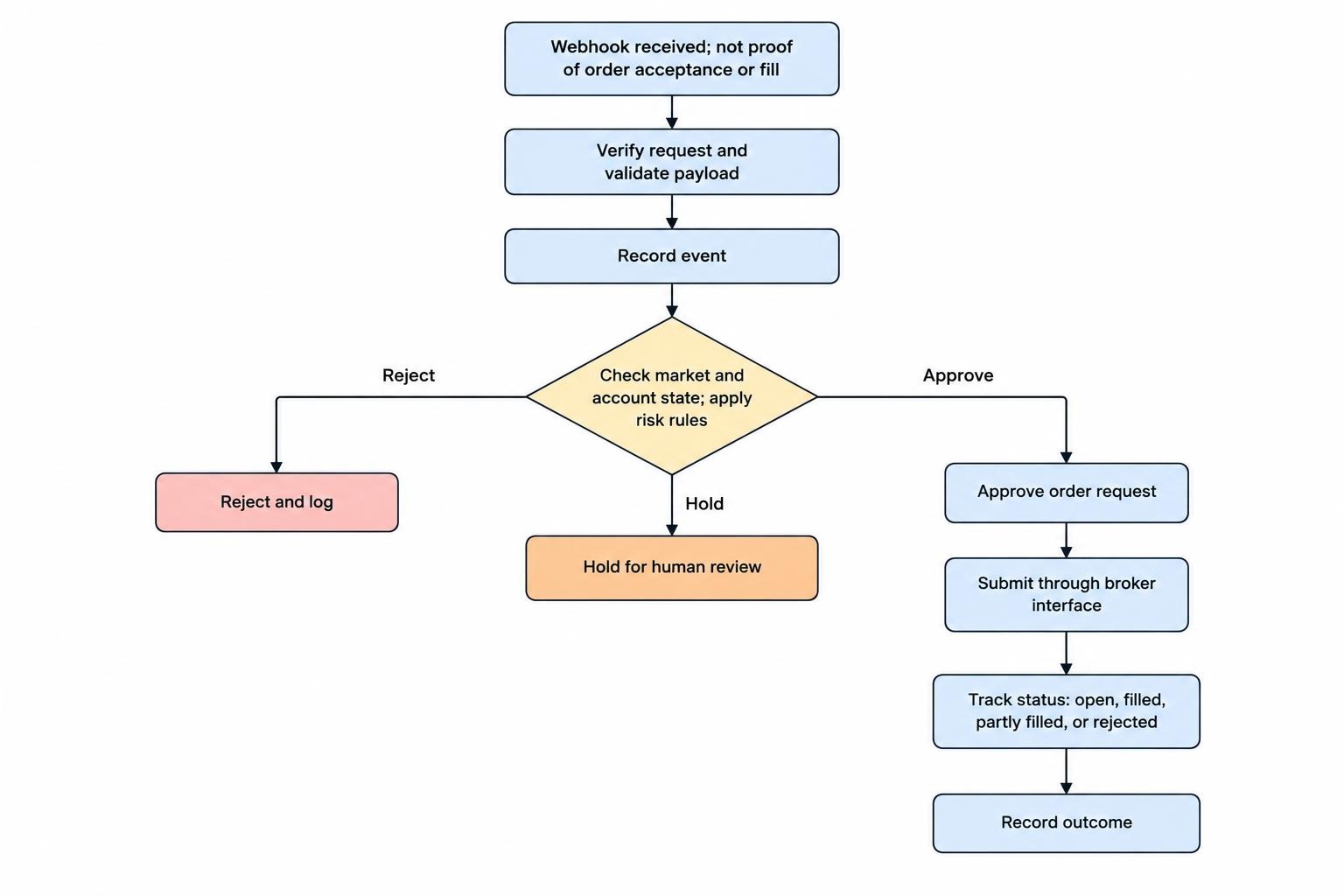
A robust flow has distinct stages. The endpoint receives the request, verifies that it is allowed, checks the payload and records the event. A processing step then checks market and account state, applies strategy and risk rules, and decides whether to reject, hold for review or create an order request. A separate execution component can submit an approved request through the broker’s interface and track its status. This division makes failures easier to diagnose: a rejected signal is different from an order rejected by a broker, and neither should be confused with a filled trade.
Do not assume that an HTTP response means an order was filled. It may only mean that the receiver accepted the webhook. Likewise, an order submission response may report that a request was accepted, while the order remains open, is partly filled, or is later rejected. Reconcile the system’s record with the broker’s order and position data before treating the intended trade as complete. The details of broker connections are covered in the guide to connecting a trading system to a broker API.
Use a persistent event log. Record when the request arrived, whether validation passed, the decision made, any order identifier returned, and the eventual order status. Keep enough detail to reconstruct what happened without storing passwords, API secrets or other credentials in plain text. Logs are useful only if they are reviewed and retained sensibly; a pile of records nobody checks is not a control.
Prevent duplicate and stale orders
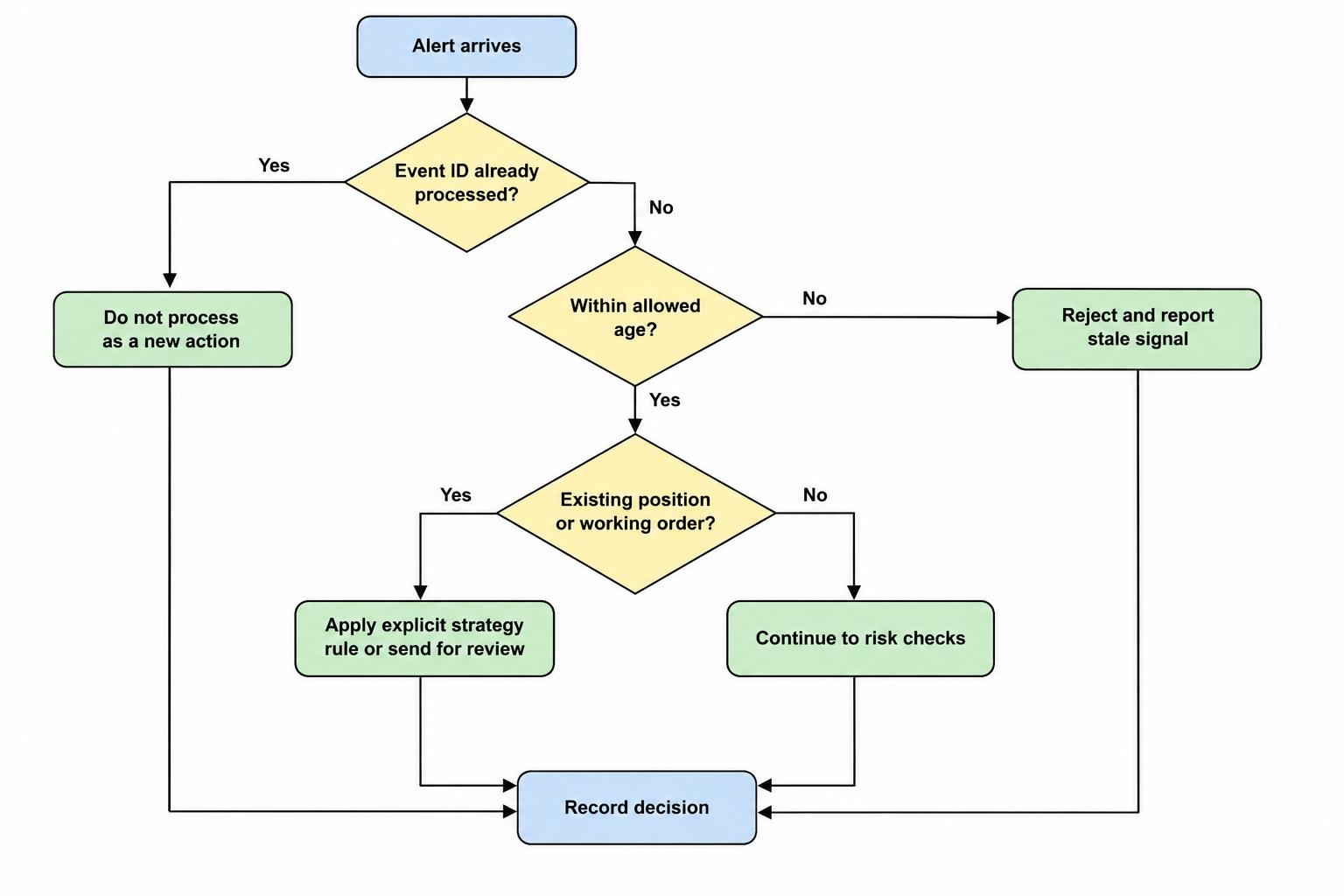
Webhook delivery is not a guarantee that every message arrives once, in order, or at the moment it is useful. A sender may retry after a timeout, a connection may drop after the receiver processed a request, or an alert may be triggered more than once. If each arrival is treated as a fresh instruction, one signal can create multiple orders. Use an idempotency check: give each event a unique ID, store processed IDs, and refuse to process the same event again as a new action.
Idempotency does not solve every duplicate. Two separate alerts can represent the same trading idea, and a restarted system may have an order still working at the broker. Check the current order and position state before creating another order. Define what happens when a signal arrives while an earlier order is open: ignore it, update a pending order under explicit rules, or send it for review. Never rely on a quick cancellation to erase the risk of a duplicate order; the original may already have filled.
Stale messages need their own check. Include a timestamp and reject an alert that is older than the strategy’s allowed age. The age limit should reflect the strategy and market, not convenience. A signal designed for a short-lived price move may be useless after a brief delay; a slower signal may remain relevant for longer, but still needs a rule. If the receiver cannot confirm the event is current, it should stop and report the issue rather than guessing.
Secure the webhook endpoint
A webhook URL is a network entry point. Treat it as such. Use HTTPS, restrict what the endpoint accepts, and keep credentials out of the message body. Where the sender supports it, verify the request using an authentication method intended for that purpose. Some services document certificate based verification; TradingView, for example, describes how a receiving application can check a certificate sent with HTTPS requests. Implement the check on the receiving side and follow the current technical instructions, rather than assuming that the presence of HTTPS alone proves who sent a request. TradingView’s webhook authentication instructions explain its certificate verification approach.
Do not expose a broker API key in an alert, a chart script, a shared configuration file or an error message. Store secrets in a suitable secret store or protected environment, restrict access, rotate them when exposure is suspected and use the narrowest permissions available. If an integration only needs to read account data or submit orders, it should not have permission to withdraw funds. Follow the platform’s supported security model, and check whether its credentials can be limited by account, instrument or action.
Consider network and application controls as well. Accept requests only on the expected endpoint, validate content types and size, rate limit repeated requests, and avoid sending detailed internal error messages back to an unknown caller. If the provider publishes stable outbound IP ranges, allowlisting may be an extra measure, not a replacement for request verification. Restrict API keys and endpoints separately. A secure webhook can still feed a system whose broker credentials are far too powerful.
Build checks before the order leaves
Before any order is submitted, the receiver should confirm that the instrument is permitted, the signal is current and the account is in an allowed state. It should also apply defined limits for order size, total exposure and frequency. Check for an existing position or working order, and reject instructions that exceed the strategy’s authority. A signal should not be able to override these controls by including a larger size in its payload. The system, not the signal source, should calculate or cap the final order size.
Set a clear failure policy. If market data is stale, the broker connection is unavailable, the account state cannot be read or a required risk check fails, the safer default is to block new orders and raise an alert. A system that keeps trading while blind may turn a small technical fault into a larger financial one. Define who can pause the strategy and how it resumes; avoid automatic restarts that immediately replay old messages or recreate an order without checking its status.
Human oversight should be meaningful, not decorative. A review screen can show the event time, model or rule version, current price, proposed order, existing exposure and the reason for the signal. Provide a simple way to reject or pause. Automated trading also needs monitoring, as covered in the guide to logs and alerts for an automated trading system. For controls that stop trading when limits or system conditions are breached, see the guide to kill switches and trading limits.
Test the whole route before using live orders
Test each stage with simulated or paper orders first. Confirm that a valid message is received, malformed data is rejected, repeated event IDs do not create repeat orders, and stale messages are blocked. Check how the system behaves when the receiver is unavailable, the broker rejects an order, or a request times out after submission. A timeout is ambiguous: the order may have reached the broker even if the system did not receive the reply. Query the broker for the order’s status before retrying.
Test with realistic account and market conditions, not only a happy path where every request succeeds instantly. Make sure the logs distinguish a signal, an order request, an accepted order and a fill. Confirm that the system stops when a safety limit is reached and that a person can disable it without editing code. Paper trading can show whether the connection behaves as intended, but it cannot prove that live execution will match simulated results. Read the guide to moving from paper trading to live trading with defined risk limits before changing from simulation to real orders.
Keep the first live deployment small and narrow. Enable one strategy, one account and a defined set of instruments; set modest order and exposure caps, then review every event and order outcome. If the alert logic or payload changes, repeat the relevant tests. A system that worked last month can fail after a change to an indicator, model, message format, broker interface or account configuration. Treat every update as a reason to check that the same signal still produces the intended decision.
Common integration mistakes
- Sending a trade command instead of a signal. The receiver then has little room to check context or apply its own limits.
- Putting credentials in the payload. Alert messages may be stored, logged or exposed in places outside the intended system.
- Assuming one delivery means one event. Retries and repeated triggers can create duplicate instructions without event tracking.
- Treating receipt as execution. A successful webhook response does not establish that an order was accepted or filled.
- Ignoring time and account state. A previously valid signal may be stale, or the account may already hold the intended position.
- Testing only successful requests. Timeouts, rejected orders and unavailable services are part of the normal failure cases a system must handle.
In the United States, some formal market access controls apply to broker dealers rather than directly to individual retail traders, so their legal scope should not be overstated. The SEC’s staff guidance on Rule 15c3-5 addresses broker dealers with market access, including controls intended to limit financial exposure and prevent certain orders from entering the market. Retail traders should still build their own system with pre trade checks, defined limits and a way to stop execution; those are practical safeguards, not a claim that the rule directly governs every personal webhook setup. The SEC’s market access risk control guidance sets out the rule’s scope and control expectations.