Automating an AI trading system means more than turning a model’s signal into an order. A live system must check that the signal is current, confirm the account and market conditions, send a valid order, track what happened, and update its records when the broker reports a fill, rejection or cancellation. If any step fails, the system needs a safe way to stop or recover. The model can be right about a trade and the automation can still lose money through a stale signal, a duplicate order or an unrecognized partial fill.
For retail traders, a sensible design keeps the AI decision process separate from the software that handles orders. The model may propose an action; deterministic rules decide whether that action is allowed, how large the order can be and what to do when execution does not go as planned. This guide focuses on that execution layer: how to connect it, set limits, monitor activity and manage failures. For the broader role of AI in a retail trading process, see AI trading for retail traders.
Separate the trading signal from order execution
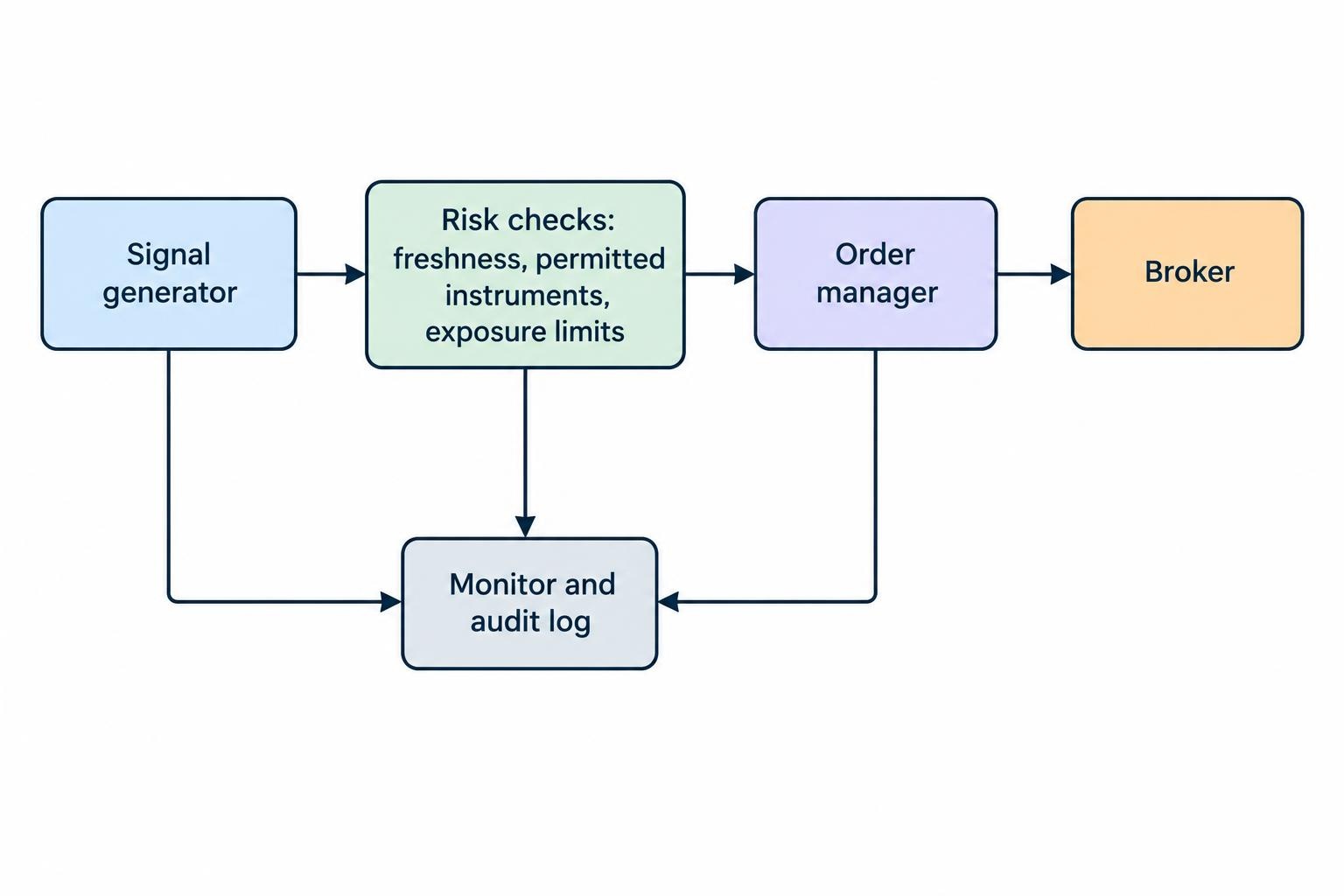
An AI model should produce a defined output, not send free-form instructions directly to a brokerage account. A signal might specify an instrument, a direction, a time window and a confidence or score. A separate rules layer checks that output against the strategy’s allowed instruments, current positions, risk limits and trading schedule. Only then should an order manager turn an approved instruction into an order request.
This separation makes the system easier to inspect. If a trade goes wrong, you can ask whether the model generated an unsuitable signal, whether a rule failed to block it, or whether the order manager mishandled the request. When these functions are tangled together, even a small change to a prompt or model can have unpredictable effects on live orders. That is a poor trade-off for software that can spend money faster than a person can read an alert.
| Component | Responsibility | Example control |
|---|---|---|
| Signal generator | Produces a proposed trade or a decision to take no action. | Require a timestamp and reject stale output. |
| Risk checks | Decide whether the proposal fits preset account and strategy limits. | Block orders that exceed a maximum quantity or exposure. |
| Order manager | Submits, tracks, cancels or replaces approved orders. | Use a unique request identifier and reconcile order status. |
| Monitor and audit log | Records events and alerts a person to problems. | Notify when an order is rejected or the system loses its broker connection. |
Keep the interfaces between components explicit. A signal should include enough information for the next stage to verify what it means, such as the instrument identifier, intended side, proposed size, generation time and a strategy or signal identifier. The execution layer should reject missing or invalid fields rather than infer what the model probably meant. If the signal cannot be interpreted safely, no order should be sent.
Build a controlled path from signal to order
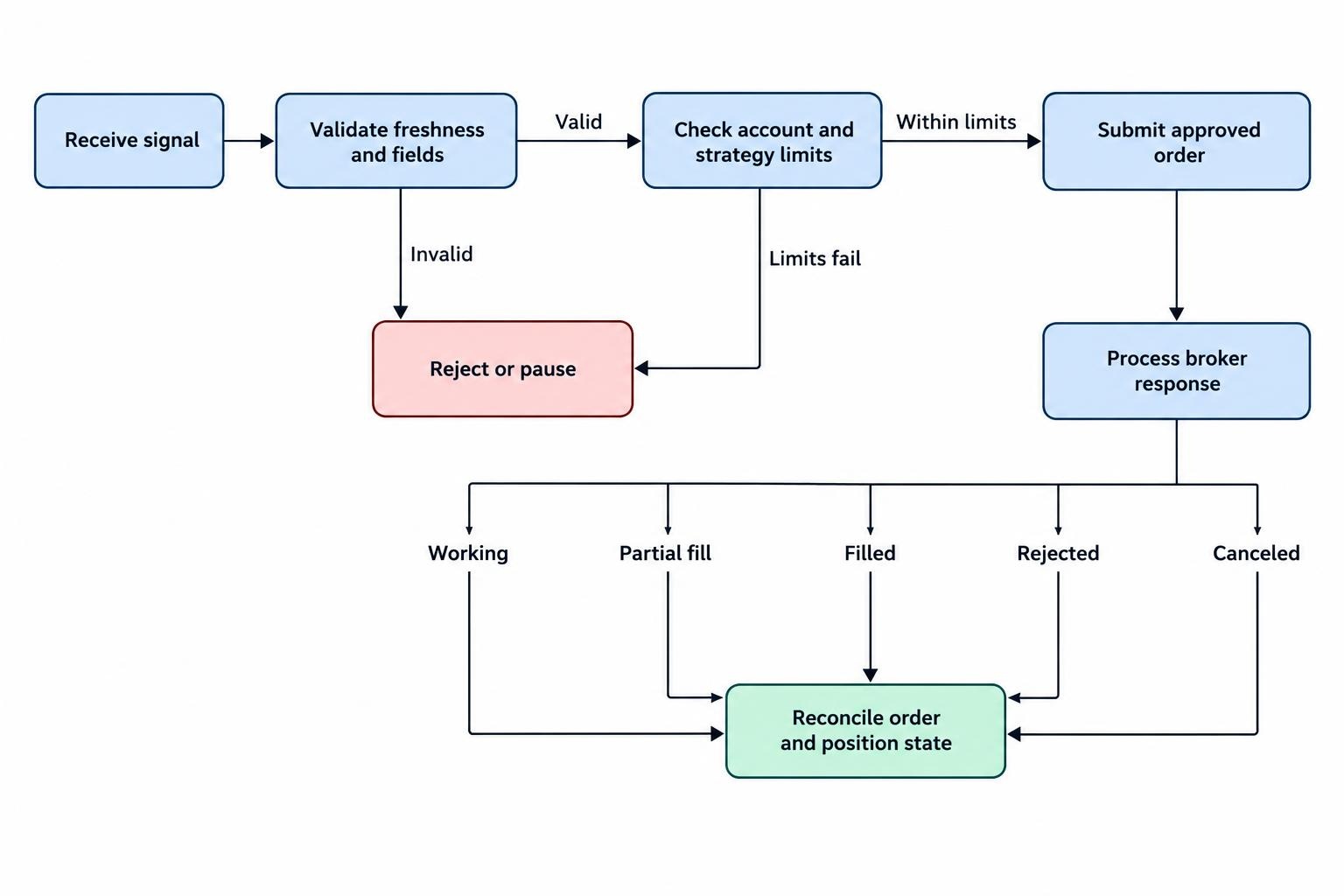
A dependable workflow moves through a small number of clear stages: receive a signal, check that it is fresh and valid, evaluate risk, create an order request, submit it, then reconcile the broker’s response with the account’s actual state. Each stage should produce a record. If a process restarts, it needs to know whether an order was never sent, is still working, has partially filled or has completed. Guessing can create a second order or leave an open position unmanaged.
Before submission, validate the instrument, side, quantity, order type and any price or time-in-force values. Check that the instrument is currently permitted by the strategy and that the account can support the proposed exposure. Reject values outside the rules; do not quietly round or substitute a different instrument unless that behavior is deliberate and tested. Define the strategy’s rules for market sessions, price bands and maximum order size before enabling live execution.
Risk checks should apply to the whole account, not only to one proposed trade. A system that limits every order separately can still build an unexpectedly large position through repeated signals, correlated instruments or multiple strategies acting at once. Set limits for open exposure and cumulative orders, and decide what should happen when a limit is reached. The correct response may be to reject new entries, cancel unfilled orders or pause the system. It should not depend on the model improvising a fix.
These are practical design controls, not a claim that a retail trader has the same legal duties as a broker-dealer. In U.S. securities markets, SEC Rule 15c3-5 places market access risk-control obligations on broker-dealers with market access. The SEC’s Rule 15c3-5 market access risk-control guidance describes controls addressing erroneous orders, financial exposure and access to trading systems. Its institutional scope is distinct, but the underlying risks—bad orders and uncontrolled access—are relevant when designing retail automation too.
Connect to the broker with restricted permissions
A broker API is a software interface for account data and order actions. The exact permissions, authentication method, supported order types and available status updates depend on the provider. Read the current documentation for the account and API you plan to use; do not assume that an example written for another broker, asset class or API version will behave the same way. A practical overview of the connection layer is covered in connecting a trading system to a broker API.
Use API credentials that grant only the permissions the system needs. If the workflow only requires market data or alerts, it should not have order-placement access. If it does place trades, avoid granting withdrawal or transfer permissions where the broker offers separate controls. Store credentials outside source code and logs, restrict access to the machine and people that need it, and rotate credentials if they may have been exposed. See the guide to protecting broker API keys and restricting trading permissions for more on credential handling.
Do not put a brokerage username, password or API secret into an AI prompt. A model does not need credentials to assess a signal, and sending secrets to an unapproved service creates an avoidable exposure. FINRA warns retail investors about auto-trading services that request account credentials and about claims that AI can make trading risk-free or guarantee returns. Its warning on auto-trading services offered by unregistered entities is relevant when evaluating third-party tools that want access to an account.
Track order states, fills and cancellations
Submitting an order is not the same as getting a fill. The request may be rejected, remain open, fill in part, fill completely, expire or be canceled. The system needs to process the broker’s status updates and maintain an accurate record of both the order and the position. A cancel request also is not proof that the order is canceled; a fill may arrive while cancellation is pending. If the system assumes otherwise, it can open a new order while the first one is still executable.
For each order, retain a unique identifier that links the original signal, the order request and later updates. Keep track of requested quantity, filled quantity, remaining quantity, average execution price and current status. When updates arrive out of order or a connection drops, retrieve the broker’s current order and position information and reconcile it against the local records. The system should treat the broker’s confirmed account state as the reference for what is actually held, while preserving its own event history for diagnosis.
Partial fills need an explicit policy. If only part of an order executes, the system must know whether to leave the remainder working, cancel it, or adjust the plan under predetermined rules. It should also update exposure based on the filled amount rather than the requested amount. This is especially important when the strategy uses a stop or another exit order: the quantity of an exit must match the position that actually exists, not the position the model hoped to open.
Order replacement deserves similar care. Depending on the broker and order type, replacing an order can involve canceling the old request and submitting a new one, or updating an existing order. The system should track the old and new identifiers and confirm which request remains active. Avoid sending repeated replacements just because a status update is delayed. That can produce multiple live orders or leave the account in a state the strategy did not intend. The guide to order types, partial fills and position reconciliation covers these execution details.
Prevent duplicate orders and handle failures safely
Duplicate orders often come from ordinary software problems: a network timeout after submission, a retry that does not check whether the first request succeeded, a repeated webhook, or a process restart that forgets what it already sent. Give each intended trade a stable unique identifier, and check whether that identifier has already been processed before creating another order. A retry should resume or verify the existing request, not blindly repeat it.
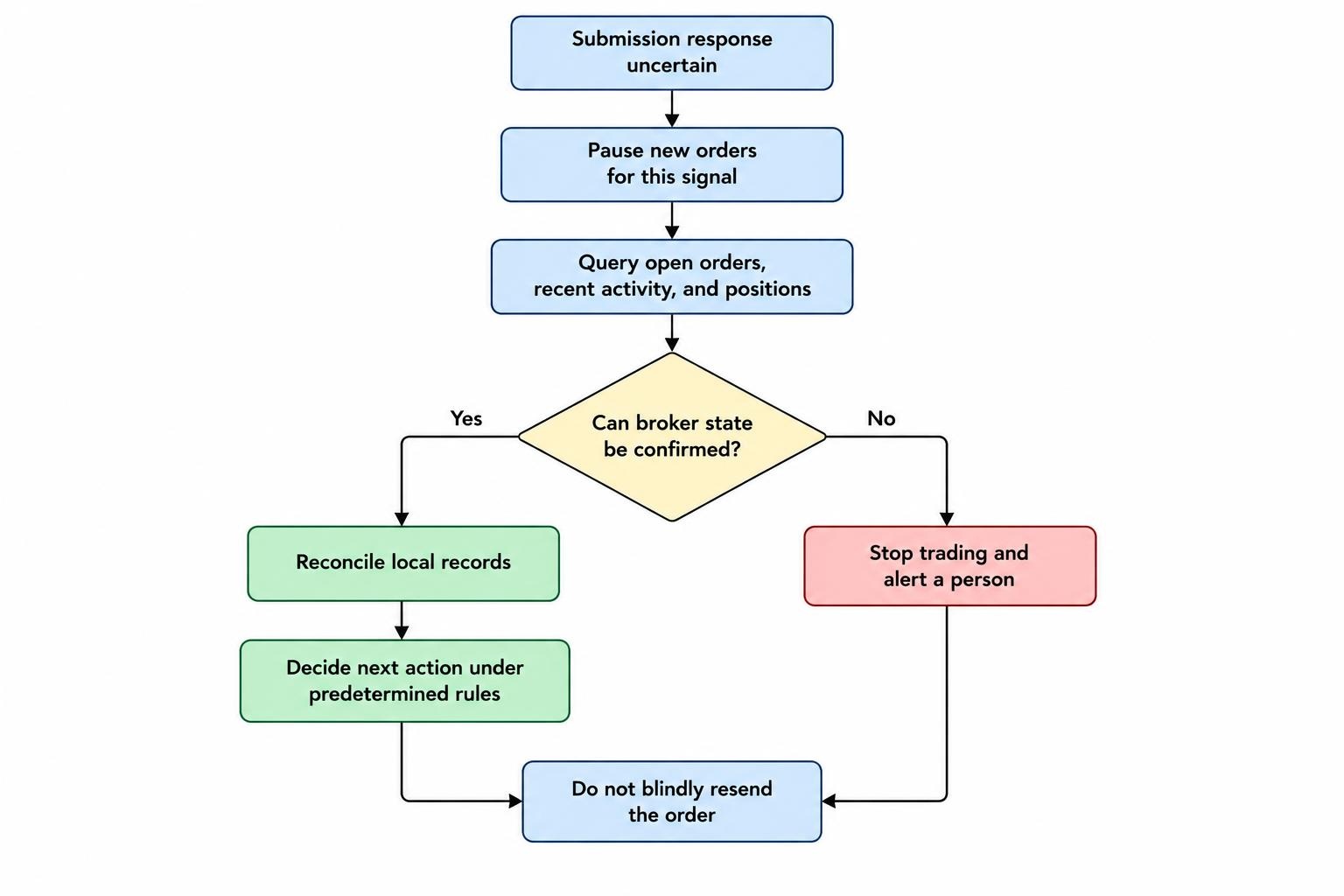
Design for an ambiguous result. If the connection fails after the order request leaves your system but before a response returns, you may not know whether the broker accepted it. Pause new orders for that signal, query open orders and recent activity, and reconcile the account before deciding what to do. If the broker’s state cannot be confirmed, stop trading and alert a person. A temporary pause is cheaper than doubling a position because a timeout looked like a rejection.
Webhooks and alerts need their own safeguards. Verify that an incoming message comes from the expected service, reject duplicate event identifiers, and validate its contents before it reaches the order process. Set sensible expiry times so that a delayed alert cannot trigger an old trade hours later. Alerts should communicate important events, but they should not be the sole record of the account’s state. The separate guide to trading alerts and webhooks explains how to connect these messages without treating them as confirmed execution.
Decide what the system does if the model, data feed, broker connection or risk-check process becomes unavailable. A useful default is to block new entries when required inputs are stale or missing. Whether existing orders should remain open, be canceled, or be managed by a fallback process depends on the strategy and order type; write that policy down and test it. A system should never interpret missing data as permission to carry on. For more failure scenarios, see preventing duplicate orders and handling connection failures.
Use limits, a pause mechanism and human oversight
Set limits before live trading, and make them independent of the model’s output. Common controls include maximum order quantity, maximum position size, a cap on total open exposure, and a limit on how many orders may be submitted during a chosen period. A daily loss threshold can also trigger a pause, although its calculation must be defined clearly: specify which realized and unrealized amounts it includes and how open positions are treated.
A kill switch should stop new trading promptly and have a predictable effect. Decide whether it only blocks new orders or also cancels working orders; these are different actions, and automatically canceling every order is not always safe. The switch should be reachable without relying on the AI component, and the system should confirm that it has entered the paused state. Restarting should require a deliberate check of open orders, positions, data freshness and the cause of the pause. More on these controls appears in kill switches, trading limits and human oversight.
Human oversight is not a substitute for controls, but it provides a way to catch problems the rules did not anticipate. Send alerts for rejected orders, unexpected position changes, repeated connection failures, limit breaches and pauses. Make each alert actionable: identify the account or strategy, show the event time, state what the system did and indicate whether further orders are blocked. Avoid messages that expose credentials or unnecessary personal information.
Log activity and monitor the live system
Keep an append-only record of the information needed to reconstruct a trade: the input data timestamp, signal identifier, model or strategy version, risk-check results, order request, broker response, subsequent status changes and relevant operator actions. Use consistent timestamps and record the time zone. Do not rely on a model’s conversational explanation as the audit trail; record the actual structured inputs and outputs used by the system.
Monitoring should detect both technical faults and trading behavior that falls outside expected bounds. Track whether market data is updating, whether the broker connection is healthy, whether orders are stuck in an unexpected state, and whether local positions match the broker’s records. Alert on repeated retries or a sharp change in order volume. A system can be technically online and still be behaving badly, so a simple “connected” indicator is not enough.
Logs can contain account identifiers, trading activity and other sensitive data. Limit who can read them, avoid storing secrets, and set a retention period that fits your operational needs. If logs are stored with a cloud provider, account for the access controls and recovery process there too. Decisions about running locally, on a virtual private server or in the cloud affect uptime and security; the guide to hosting a trading system covers those trade-offs.
Test the execution path before going live
Test more than whether the model emits a plausible signal. Confirm that invalid orders are blocked, repeated messages do not create duplicate orders, partial fills update positions correctly, and canceled or rejected orders are recorded. Simulate a slow response, a disconnect after submission, a process restart and stale market data. Check that each case ends in a defined state, such as reconciled, paused or awaiting human review, rather than an order request being sent on hope.
Paper trading can help test the workflow, but simulated execution cannot prove that live fills, spreads or system behavior will match. Keep the first live deployment small enough that an error is manageable, use strict order and exposure limits, and monitor every event closely. Increase scope only after the system has demonstrated that it can submit, track and reconcile orders as designed. See what paper trading can establish about an AI system for the limits of simulated results.
Finally, make changes deliberately. Record changes to model versions, prompts, risk parameters, API permissions and execution logic. Test a change in a separate environment where possible, and have a rollback plan if it causes unexpected behavior. Automation reduces manual steps; it does not remove operational responsibility. A safe system is one that can say “no trade,” stop when its state is unclear, and leave enough evidence for a person to understand what happened.