A kill switch is the control that stops an automated trading system from sending new orders, cancels orders that are still open, or both. A trading limit sets a boundary the system should not cross, such as a maximum position size or daily loss. Human oversight provides a way to check that the controls work and decide what to do when they activate.
These safeguards matter for AI-assisted systems because an error can move from a model output to an order quickly. A bad signal, stale price feed, software change or repeated request may create trades the operator did not intend. No single control can prevent every failure. A safer setup uses several layers: limits before an order is sent, checks on live positions and order status, a reliable stop mechanism, and a clear recovery process. This article focuses on those safeguards; the wider stages of designing and supervising an automated system are covered in the guide to automating AI trading and managing execution.
What a kill switch should do
“Stop trading” can mean different things. A button may stop the model from generating new signals while leaving existing orders untouched. Another control may cancel outstanding orders but leave filled positions open. A third may also submit orders intended to close positions. Those are different actions, with different risks. Before relying on a kill switch, write down exactly what it affects: signal generation, order submission, open orders, positions, or all of them.
In many systems, the safest first action is to prevent new exposure and cancel orders that have not filled. Closing every open position automatically can create a separate problem. A closing order may execute at a poor price, fail during a market disruption, or add exposure if the system misidentifies the position. Traders should choose whether emergency shutdown means “stop adding risk” or “attempt to flatten positions,” then test that behavior under realistic conditions.
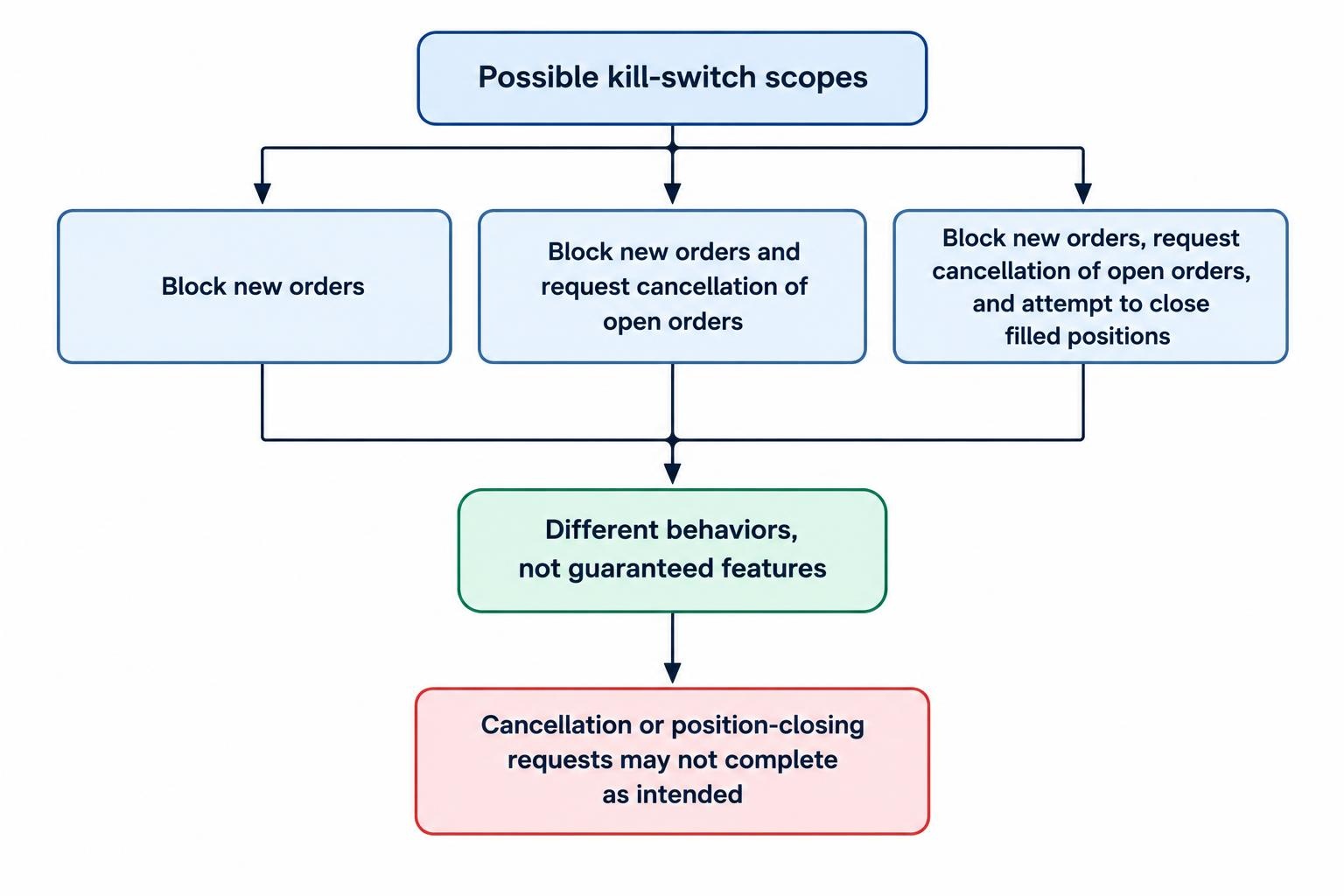
Exchange and regulator materials for institutional markets discuss controls such as kill switches, price collars and cancel-on-disconnect as ways to manage electronic trading risks. Those controls do not guarantee a retail user’s platform offers the same features, and a regulatory requirement for a broker or exchange is not a personal safety system. The SEC’s guidance on Rule 15c3-5 market-access controls describes duties applying to broker-dealers with market access, not a universal checklist that every retail trader can switch on.
Use several layers of limits
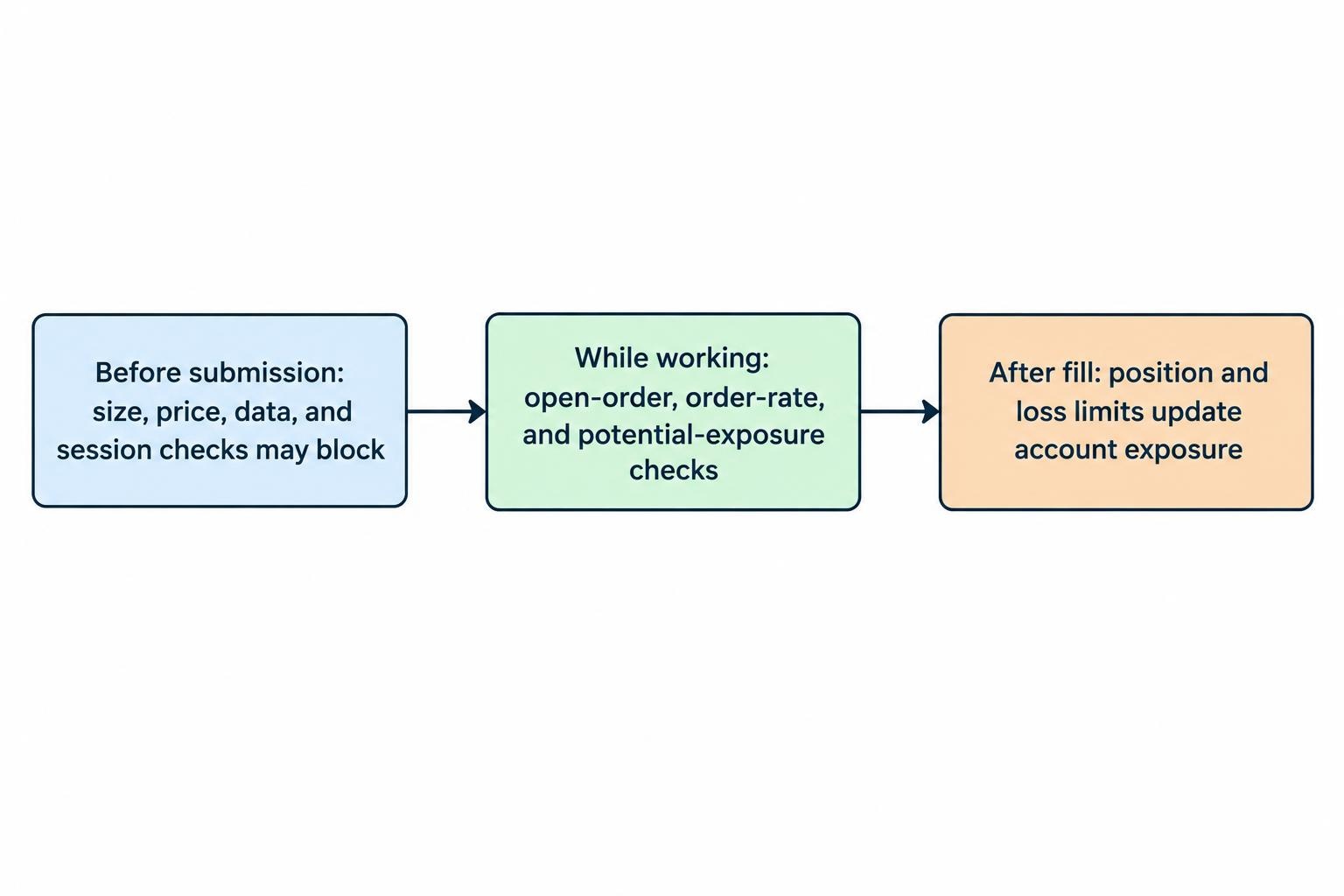
A single daily loss cutoff is not enough. A system could exceed a position limit in one instrument before the daily loss threshold is reached; a burst of duplicate orders could also create a large position before a loss appears. Set controls at the points where risk enters the system: before orders are sent, while orders are working, and after fills change the account’s exposure.
| Control | What it limits | What to check |
|---|---|---|
| Maximum order size | The quantity or value of one order | Reject orders that exceed the cap, even if a model requests them |
| Position and exposure caps | Holdings in one instrument and across the account | Count filled positions and orders that could still fill |
| Order rate and open-order caps | Repeated requests or too many working orders | Set a limit per time window and prevent duplicate submissions |
| Loss and drawdown limits | Losses over a defined period or from a chosen peak | Specify how realized and unrealized losses are counted |
| Price and data checks | Orders based on implausible prices or stale data | Block trading when the feed is delayed, missing or inconsistent |
| Trading session limits | Orders sent outside permitted hours or after a cutoff | Account for the instrument’s session and time-zone changes |
Use values that match the strategy and account, not arbitrary numbers copied from another trader. The point is to prevent an order or sequence of orders from exceeding a risk budget chosen in advance. A cap should be enforced by the order-handling layer where possible, not only by asking the AI model to “be careful.” A model can generate a sensible explanation and still produce an unsuitable order.
Count potential exposure, not only current holdings. If an account is long 100 shares and has a further buy order for 100 shares still open, a position check that sees only the filled 100 may permit another order that pushes the eventual holding well above its intended maximum. The calculation should include working orders and any orders whose status is uncertain. This is one reason accurate order tracking matters; see the guide to order types, partial fills and position reconciliation.
Set clear triggers and actions
A limit is useful only if the system knows what to do when it is reached. Define each trigger, the response, and whether trading can resume automatically. A warning may be enough for a soft threshold, such as approaching a daily loss cap. A hard threshold should block further risk without waiting for a person to notice a message. Avoid designing a control that silently changes its own threshold in response to market conditions or model output.
| Trigger | Possible response | Human decision |
|---|---|---|
| Position or order cap reached | Reject new orders that add exposure | Review the account and open orders before changing the cap |
| Daily loss threshold reached | Stop new entries and alert the operator | Decide whether the strategy stays disabled for the session |
| Stale or inconsistent market data | Block new orders until the feed is confirmed healthy | Check whether existing orders should be canceled |
| Repeated errors or unusual order rate | Pause order submission and raise an urgent alert | Inspect logs and order status before restarting |
| Connection loss or unknown order status | Pause new orders; reconcile with the trading account | Confirm whether orders filled, remain open or were canceled |
Keep the trigger and action separate from the model’s recommendation. If a system hits its daily loss limit, the model should not be allowed to argue that one more trade will recover the loss and switch trading back on. A human can review the event, but changing a hard limit should require an explicit action, a reason, and a record of the change. Consider a cooling-off period or a restart that requires a deliberate confirmation rather than an automatic reset at midnight.
Design the kill switch for failure, not just normal use
A kill switch should remain useful when the part of the system that sends orders is malfunctioning. If the only stop control is a button in the same application that has frozen, it may not be a dependable emergency control. Where the platform permits it, keep a separate way to disable order submission or revoke the system’s trading permission. Know what the broker or platform can do if the local application cannot reach the account.
Test the switch in a safe environment before relying on it. Confirm whether it blocks new orders, cancels open orders, and reports the result. Try it while an order is pending and when the connection is slow. A cancellation request is not proof that an order has been canceled; check the final order status. If the system supports a “cancel on disconnect” feature, learn what causes it to activate and whether it applies to all relevant order types.
Do not assume “flatten all” is a harmless emergency button. It may submit market orders across several instruments, and those orders can be delayed, partially filled or rejected. If the system offers that function, know whether it uses market or limit orders, how it treats positions that changed moments earlier, and what happens if only part of the account is reachable. For some strategies, stopping new entries while leaving positions under separately defined protection is safer than a blind close-all command.
Operational safeguards should also cover the software around the model. A duplicate request after a timeout can create a second order if the system retries without checking the first request’s status. An expired API key may stop trading, while a compromised key with broad permissions may allow unwanted orders. Use narrow permissions where available, store credentials securely, and prepare a way to disable them. The related guide to protecting broker API keys and restricting trading permissions covers those controls.
Make human oversight specific
“Monitor the bot” is not an operating procedure. Assign a person to check defined information at set intervals or when an alert fires: current positions, open orders, realized and unrealized losses, connection health, data freshness, and whether the system has entered a paused state. The operator should know which conditions permit a restart and which require investigation. If nobody is available to respond, configure the system to fail closed—stop sending new orders—rather than continue trading without reliable checks.
Human oversight is not a replacement for automatic limits. People can miss alerts, misunderstand a partial fill, or act too slowly during a fast market. Automated controls can also be wrong, especially if their inputs are stale or incomplete. Use both: mechanical checks for clear boundaries, and a human review for incidents that require judgment. FINRA’s guidance for firms using algorithmic strategies emphasizes risk assessment, code development, testing, system controls and monitoring; it is directed at regulated firms, but those areas offer a practical framework for checking a personal system too. Read the FINRA guidance on supervision and controls for algorithmic trading with that distinction in mind.
Alerts should identify what happened and what action was taken. “Risk limit triggered” is a start, but a useful notice also gives the instrument, order identifier, time, current position if known, and whether the system blocked new orders or requested cancellations. Route urgent alerts to a channel the operator actually checks. A flood of routine messages can bury the one alert that matters, so group repeated notifications without suppressing a genuine change in status. Logging and alert design are covered in monitoring an automated trading system with logs and alerts.
Test controls before live use and after changes
Test more than the happy path. Check that an oversized order is rejected, a daily loss threshold blocks new entries, stale data stops order generation, and a disconnect does not lead to uncontrolled retries. Test partial fills, delayed acknowledgements, rejected orders and restarts. Verify that a threshold survives a software restart and that the system cannot reset a limit simply because it has lost its local state.
Record the expected result for each test, then compare it with what the system actually did. A paper-trading environment can show whether logic behaves as intended, but it may not reproduce live execution, delays or every broker-side response. Paper testing is useful evidence about system behavior, not proof that a live kill switch will work under all conditions. The guide to paper trading an AI system explains what simulated results can and cannot establish.
Repeat relevant tests after changes to model prompts, code, data sources, order logic, risk thresholds or account connections. A small change to how the system interprets a signal can alter order frequency; a change in order handling can affect cancellation behavior. Keep a record of the version tested, the limits in force, the test result, and who approved deployment. FINRA’s guidance describes testing and review through development and deployment for member firms; a retail trader can use the same basic discipline without treating that guidance as a rule that applies directly to every personal account.
Plan recovery before an incident
After a stop event, do not restart just because the error message disappeared. First check the account directly, reconcile filled positions and open orders, confirm whether any cancellation requests completed, and identify the trigger. If the cause is unclear, leave automated order submission disabled. Restarting a system with an unknown order state can create duplicate orders or add risk to a position that already exists.
Use a short incident checklist that can be followed under pressure:
- Stop new order submissions using the tested control.
- Check positions, open orders and recent executions in the trading account.
- Confirm the status of every cancellation request; do not assume it succeeded.
- Record the alert, system state, relevant logs and actions taken.
- Identify the cause and test the fix before enabling live orders again.
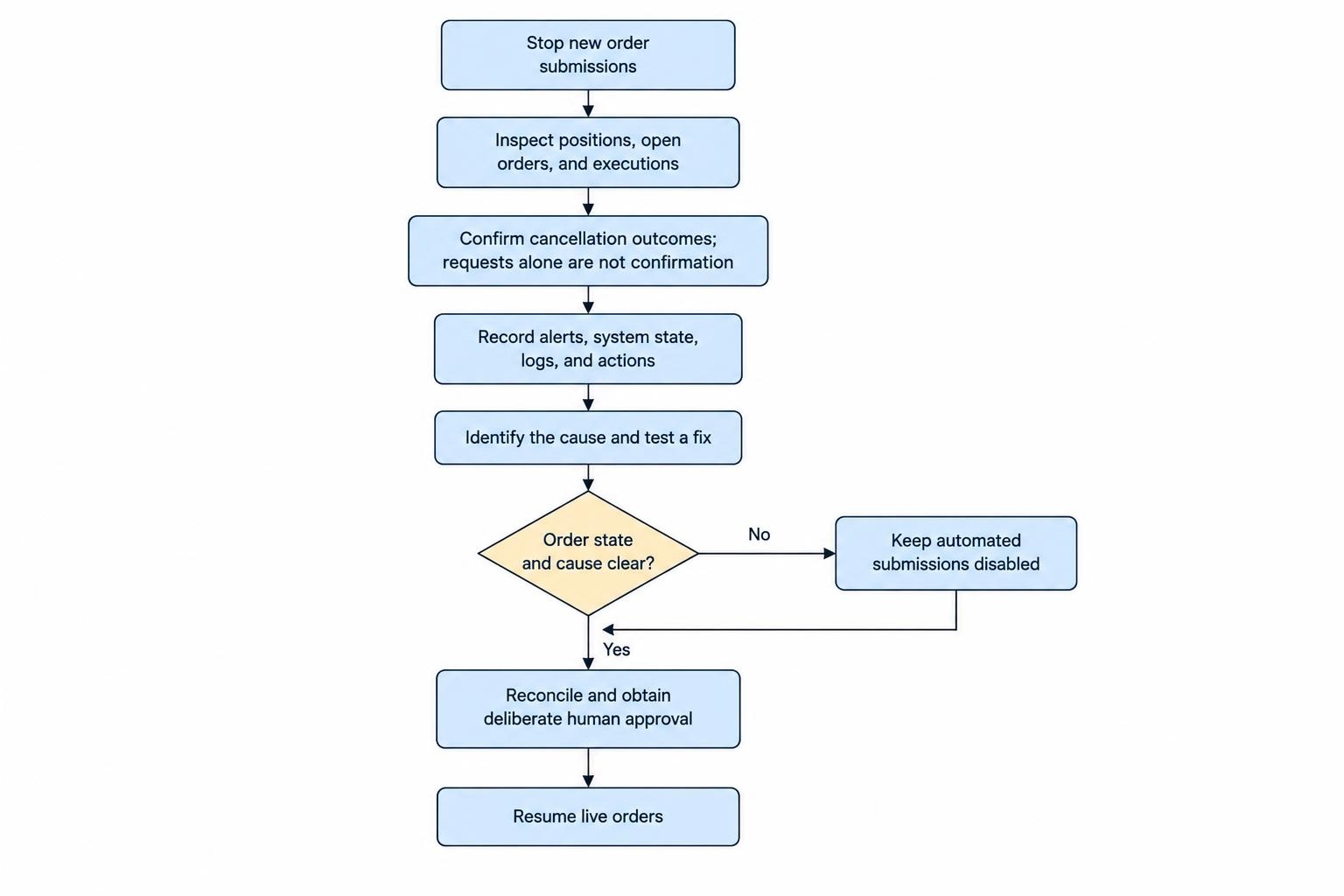
Set a restart condition in advance. That might require a healthy market-data feed, confirmed order reconciliation, a cleared software fault and a human approval. For a recurring or unexplained trigger, review the strategy’s recent behavior before returning to live trading. Model drift can change signal quality over time, so a system that was once within its expected operating range may need fresh evaluation. See the guide to model drift, performance decay and retraining decisions.
Retail safeguards and regulatory duties are different
U.S. rules for firms with market access include formal risk-control duties, but those duties should not be confused with a personal trader’s own controls. The SEC states that Rule 15c3-5 applies to broker-dealers with market access to securities exchanges or alternative trading systems; its staff guidance also discusses pre-trade thresholds and control over those safeguards. That does not mean a retail user’s application has an equivalent kill switch, or that the user can rely on a broker’s controls to manage every account-level risk.
Check the features and limits of the platform you actually use. Ask whether it can block new orders, cancel working orders, cap exposure, stop after a loss threshold and provide a clear record of fills. Confirm how to disable access if the system behaves unexpectedly. Broker and venue controls can add protection, but they do not replace limits in the user’s own workflow or a clear response plan. For wider personal risks associated with automated systems, see AI trading risks and trader protection.