An automated trading system can be running while its strategy is already offline, trading on stale prices, or waiting on an order that never completed. Monitoring helps detect those failures before they turn into unexplained positions or missing records. Logs preserve what the system did; metrics show how it is performing over time; alerts call for attention when a condition needs a response.
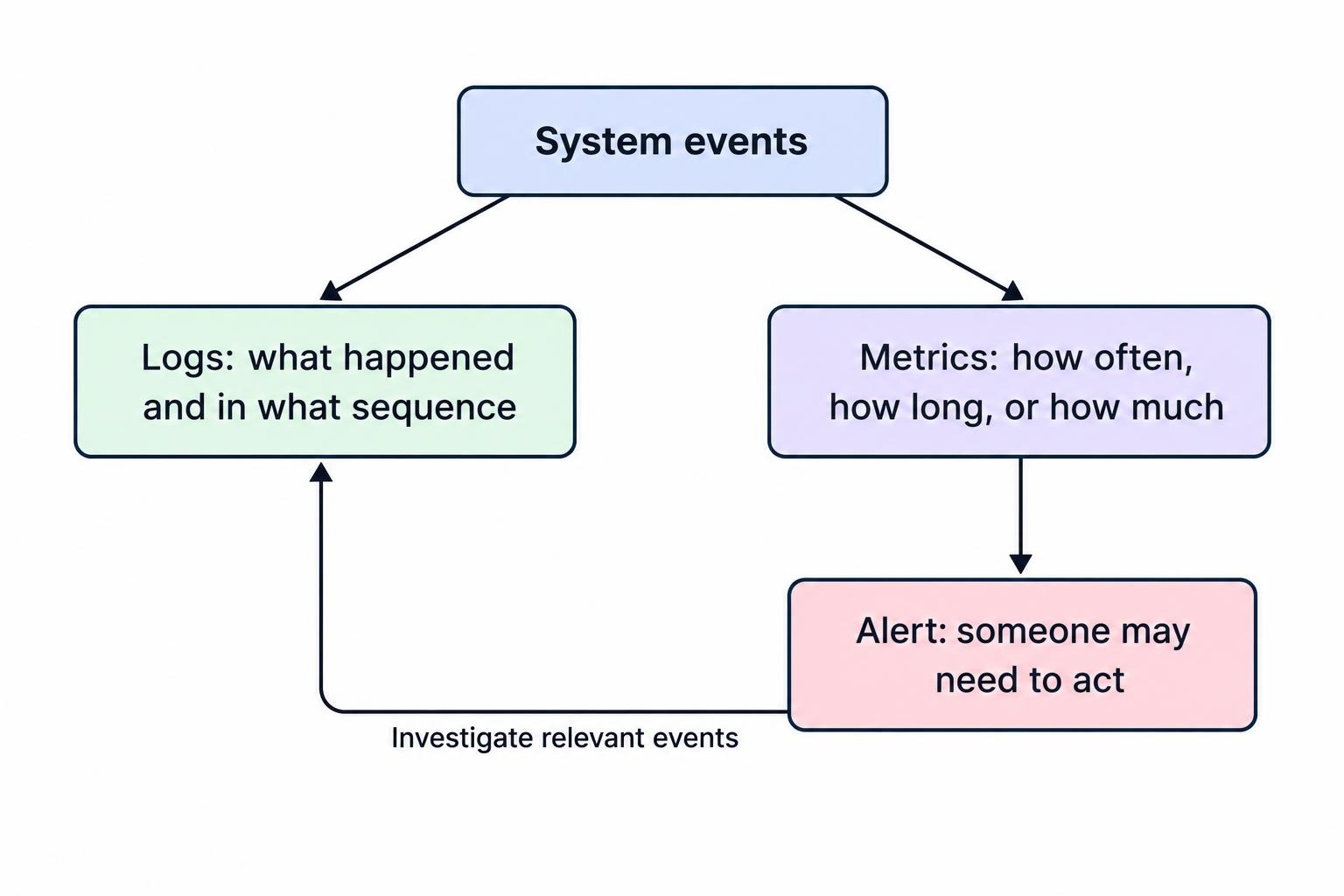
These parts work together, but they serve different purposes. A log can show that an order was rejected at 14:03:12. A metric can show that rejection rates have risen over the past hour. An alert can notify the operator when the rise crosses a threshold worth investigating. A useful setup makes it possible to move from alert to relevant events quickly, without relying on someone to stare at a dashboard all day.
Monitor the full trading process, not just the model
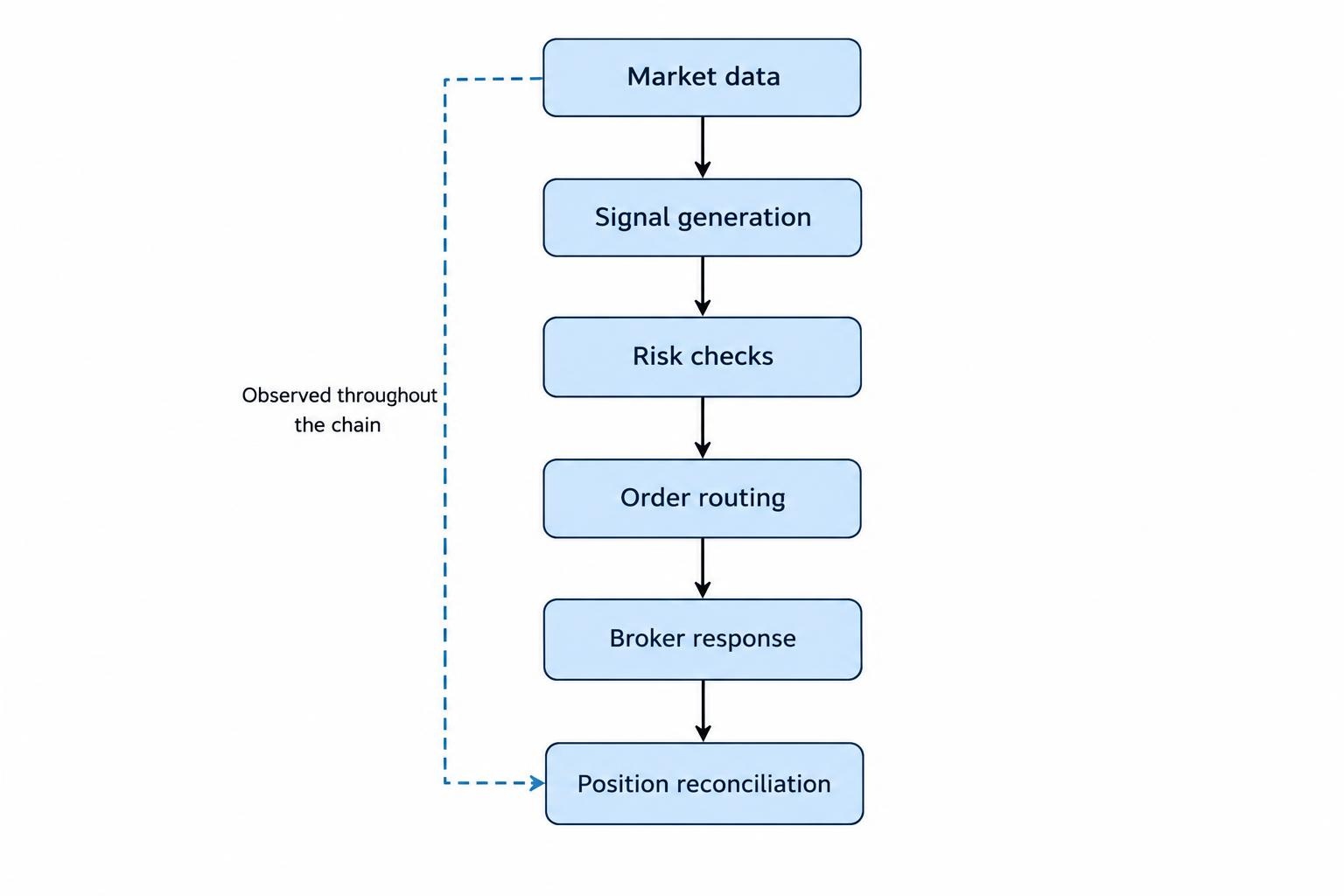
A trading model is one component in a chain that may include market data, signal generation, risk checks, order routing, broker responses, and position updates. A healthy model process does not prove that the full chain is healthy. The feed may be delayed, an order may be rejected, or the system may fail to record a fill. Monitoring should cover the parts that can change a decision or leave the account in a state the system does not recognize.
Start by mapping the path from data arrival to account reconciliation. For each stage, decide what “working” means and what evidence would show a failure. A data connection might be considered healthy only when recent messages arrive and their timestamps fall within an expected range. Order handling might be considered healthy when each submission receives a response and the reported status is stored. The details depend on the market, strategy, and execution setup; a system that sends occasional orders has different normal activity from one that trades throughout the session.
This is part of automating AI trading and managing execution: observing the strategy alone is not enough. Monitoring needs to include the operational steps that turn a signal into an account change.
What to record in trading system logs
Logs should let an operator reconstruct important events in order. Record a timestamp with a clear time zone, the software component, event type, severity, and a correlation identifier that connects related events. For a trading event, useful fields may include the instrument, strategy or model version, signal identifier, order identifier, requested quantity, order type, and response status. Store only the data needed to diagnose the event. A full account response or API payload can contain sensitive information that should not be copied into general logs.
Record decision and execution stages separately. A signal generated, a risk check passed, an order submitted, a broker acknowledgement received, a partial fill reported, and a position reconciled are different events. Combining them into one message such as “trade successful” makes later investigation difficult: it hides which stage completed and which did not. In Python, the standard logging tools support event severity levels and can route records to different destinations; choose a configuration that preserves useful events during normal operation as well as failures. The Python Logging HOWTO describes the standard levels and logging components.
Use consistent, structured fields where possible, so records can be filtered by order ID, instrument, or event type. Keep clocks synchronized across the processes involved, and record both the event time and, where useful, the time the system received it. Those times can differ when messages are delayed. Avoid credentials, API keys, full payment or account details, and unnecessary personal information. Protect access to stored logs, set a retention period, and test that logging failures do not silently disable the trading process or fill available storage. The OWASP Logging Cheat Sheet covers sensitive data, log protection, and testing logging failure modes.
Logs, metrics, and alerts have different jobs
| Monitoring component | What it answers | Trading system example |
|---|---|---|
| Logs | What happened, and in what sequence? | An order was submitted, then rejected with a recorded response. |
| Metrics | How often, how long, or how much? | Order rejection rate or market data delay over time. |
| Alerts | Does someone need to act now? | A position mismatch remains unresolved past the system’s allowed interval. |
Metrics turn repeated events into a view of system health. Track measures that correspond to the trading process: age of the latest market data, time to process a signal, API response latency, rejected and partially filled orders, mismatch between expected and reported positions, and the number of active connections. Depending on the strategy, useful measures may also include price deviation between the signal and the submitted order, or the time elapsed between an order request and its final status.
Use dashboards to answer practical questions, not to display every number the system can produce. An operator should be able to see whether the system is active, whether its inputs are current, whether orders are progressing, and whether account state matches the system’s records. Keep detailed event investigation in logs. Google’s guidance on monitoring distributed systems distinguishes monitoring for alerting, trend analysis, and debugging, and warns that noisy alerts can be ignored.
Set alerts around conditions that need a response
An alert should describe a condition that matters and give the recipient enough context to decide what to do. “Trading system error” is a poor alert if it leaves the operator searching through several services to find the affected strategy. A clearer message identifies the component, account or environment where appropriate, the condition, when it began, and a link or identifier for the relevant logs. Do not include secrets in the notification.
Group alerts by urgency. A brief delay that recovers on its own may belong on a dashboard or in a review queue. A failed connection, repeated rejected orders, an unrecognized open position, or a risk control that cannot be verified may require immediate attention, depending on the system’s safeguards. Set thresholds based on the strategy’s normal operation and the consequences of a missed event. A single rejected order may be routine; a sustained rise in rejections could point to a broken integration or changed market conditions.
Short delays or minimum-duration conditions can reduce alerts caused by momentary fluctuations. They should not postpone notification when a failure demands immediate action. Test each rule against recorded events or simulated conditions, and check that its message reaches the right destination. Google’s practical alerting guidance describes alert thresholds, delay windows, and routing; the useful principle is to favor alerts that prompt a clear response over a stream of minor warnings.
Trading events worth monitoring
Market data needs checks for connection status, message age, missing updates during expected trading periods, and values that fail basic validation. A connected feed can still be stale, so connection status alone is not proof that prices are usable. Signal monitoring can record when the model runs, whether it produces a valid output, and whether its inputs meet the strategy’s requirements. If a model stops producing signals, that may be normal for one strategy and a fault for another; interpret the event in context.
Order monitoring should follow the lifecycle from submission through acknowledgement, partial fill, completion, cancellation, or rejection. Make sure the internal record can be matched to the order reported by the execution venue or service. Reconcile positions and open orders periodically, rather than assuming that a successful submission means the intended trade occurred. These checks complement the controls in order management for automated trading, where partial fills and position reconciliation require their own handling.
Also monitor the system that delivers alerts. If an alerting service, email route, or phone notification fails, the trading process may continue while the operator receives nothing. Track the last successful check-in from each running component, and create a separate warning when expected heartbeats stop. A “green” dashboard that has stopped receiving updates is not evidence of a healthy system.
Make alerts useful during an incident
For each high-priority alert, write down the first safe action and the checks that follow. The response might be to pause new order submissions, verify account positions through the relevant interface, or disable an affected strategy while preserving existing records. The right response depends on the system and its permissions; an alert should not trigger an automatic action unless that behavior has been deliberately designed and tested.
Keep a short incident record: when the condition began, which alert fired, what action was taken, what the system showed, and how normal operation was restored. This creates a usable timeline for diagnosing recurring faults. If the issue involves a missed, duplicate, or uncertain order, use the relevant procedure for execution failures rather than resubmitting an order based only on the absence of a confirmation message.
A monitoring plan should also state who receives alerts and what happens when that person is unavailable. A system that runs unattended needs a realistic response plan, not just a notification channel. Review alert volume periodically. If a condition repeatedly generates messages that nobody acts on, revise the rule or route it to a less urgent channel. If a real fault was discovered only during a later review, add a monitor for the missing signal.
Protect logs and test the monitoring setup
Logs can reveal trading activity, system design, and account details. Restrict who can read or change them, protect stored copies, and avoid placing API keys or credentials in event messages. Consider how log files rotate, where records are retained, and what happens when a disk or remote logging service is unavailable. OWASP recommends testing logging behavior under failure conditions, including loss of storage capacity or connectivity. Monitoring itself needs tests too: generate a known event, confirm that it appears in the right log and dashboard, then verify that a test alert reaches its intended recipient.
Test the trading system’s own failure signals in a paper or otherwise controlled environment before relying on them during live operation. Examples include a stale data feed, a rejected order, a missing heartbeat, a failed notification route, and a discrepancy between internal and reported positions. Confirm that the event is detected, that the alert arrives with useful context, and that the documented response is possible. Keep credentials and execution permissions separate from monitoring tools where practical; the guidance on protecting broker API keys and restricting trading permissions addresses access boundaries.
A practical monitoring review
Review the system after software changes, data-provider changes, execution changes, or strategy revisions. Confirm that event names and fields still match what dashboards and alert rules expect. Check whether the time windows and thresholds reflect the system’s current trading hours and activity. Look at recent incidents and near misses: did the logs preserve the evidence needed to diagnose them, and did an alert arrive early enough to be useful?
For each component, confirm that an operator can answer four questions: Is it running? Are its inputs current? Are its outputs being handled? Can its state be reconciled with the account or external service? Record the answers in a simple runbook, along with the safe actions available if a check fails. The runbook should distinguish between pausing new activity and closing or changing existing positions; those actions have different consequences. Any automated stop condition should be reviewed alongside the system’s broader trading limits and human oversight controls.
Monitoring does not prevent every fault, and an alert cannot guarantee that a person will respond in time. Its practical value is narrower and measurable: preserve an accurate record, surface failures that matter, and make diagnosis less dependent on guesswork. A trading system should be able to explain what it received, what decision it made, what order it sent, and what happened afterward. When those records and checks are missing, even a profitable-looking dashboard may leave the most important question unanswered: what is the system actually doing right now?