AI trading assistants may receive more than a market question. A prompt can contain account details, a broker statement, a screenshot of an open position, or an API key pasted in by mistake. Once that information leaves your device, its handling depends on the tools and services involved: the AI provider, connected apps, storage settings, and any integrations that process the request.
Privacy protection starts before you submit data. Identify what an assistant can see, what it stores, and what permissions it has. Then share only what the task requires. A chart question rarely needs your full name or account number; a trading journal review usually does not need a live broker password. Keeping those details out of prompts reduces the damage a mistake or account breach could cause.
What financial data can an AI trading assistant expose?
Personal data includes obvious identifiers such as your name, email address, phone number, and home address. Financial data can include account numbers, balances, transaction history, tax documents, and statements. Trading records may show strategy rules, position sizes, entry and exit times, watchlists, or unrealized losses. On their own, some of these details may seem harmless. Combined, they can reveal how much you have, where you trade, and when you may be vulnerable to a convincing scam.
Credentials need special care. Passwords, authentication codes, recovery phrases, private keys, and broker API secrets can grant access rather than simply describe your account. Don’t paste them into an AI chat, even if you are asking for help with a connection error. If a tool needs credentials, use its documented authorization flow and check which permissions it requests. The basics of restricting and protecting broker API keys matter whether the connection is managed by you or by a third-party platform.
There is also less obvious data. A screenshot can show account balances, browser tabs, usernames, or notification previews. A file may contain hidden metadata, such as the author’s name or a device identifier. Chat logs and error reports can include fragments of requests or account details. Before uploading a file or image, inspect what is visible and remove anything unrelated to the question.
Where information can go
A trading assistant may run entirely on your device, send prompts to a cloud service, or combine both approaches. Connected features can add more destinations: a brokerage, a market-data provider, cloud storage, a plug-in, or an automation service. The path is not always obvious from the chat window. Read the product’s privacy and security information to check what is collected, how long it is retained, whether it may be used to improve or train services, and how deletion requests work. These terms and settings can differ by product and plan, and they can change.
Also check what happens when you connect accounts. An integration might receive read-only access to positions and balances, or permission to place trades and make other changes. Those are very different risks. A model that can summarize a watchlist does not necessarily need permission to submit orders. Review the requested scopes before approving access, and avoid granting broad permissions simply because they make setup quicker. For practical distinctions between API connections, alerts, and order handling, see how trading systems connect to broker APIs.
Be careful with browser extensions, unofficial integrations, and copied prompts from online groups. A tool can appear to be an assistant while collecting more information than its stated purpose requires. Check who operates it, what data it requests, and whether you can revoke access. A polished interface is not a security review.
Minimize data before you send a prompt
The safest sensitive detail is the one you never share. Start by describing the task in general terms, then add only the information needed for a useful answer. Instead of uploading a full brokerage statement, you might provide a redacted excerpt with the relevant dates and figures. Replace names, account numbers, addresses, and other identifiers with labels such as “Account A” or “Trade 1.” If your question concerns a strategy rule, share the rule and anonymized examples, not your entire transaction history.
Redaction must remove the underlying information, not just cover it visually. A black box placed over text in an editable document or image may leave the original content recoverable. Export a clean copy and check it before uploading. For recurring research, prepare a separate dataset containing only the fields you need. The FTC’s guidance on limiting collected and retained personal information describes the value of keeping data only when it serves a real purpose; the same habit is useful for an individual trading workflow.
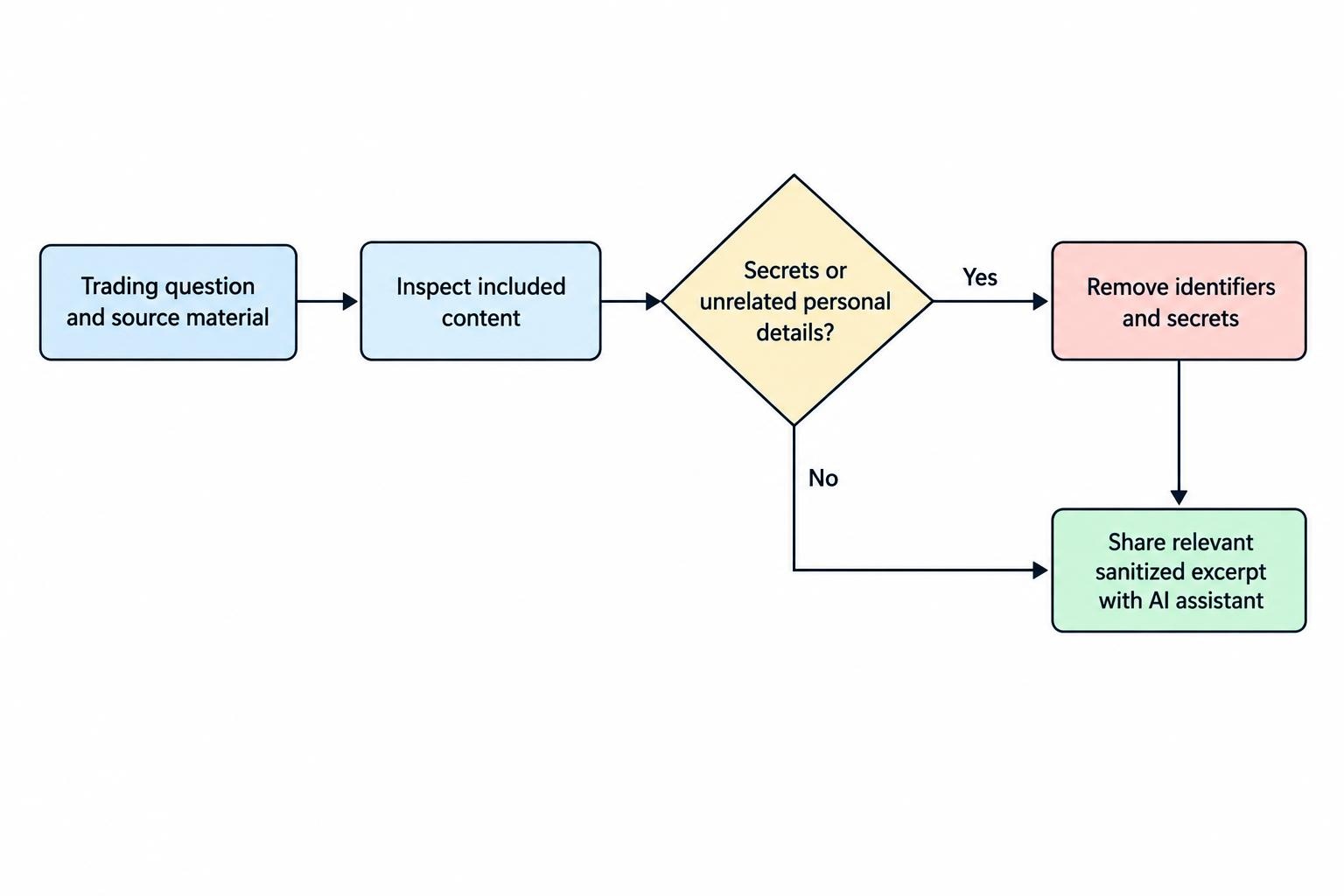
Set a simple rule for prompts: never include passwords, one-time codes, API secrets, recovery phrases, or private keys. Don’t share another person’s financial information without a clear reason and permission. Avoid attaching whole email threads or account exports when a short, sanitized excerpt will do. Convenience has a habit of making “just this once” into a routine.
Check the service before connecting accounts
Before paying for a platform or linking a brokerage, look beyond marketing claims. Find its privacy policy, data retention terms, security contact, and explanation of third-party providers. Check whether account data is used to train models, whether that use can be disabled, and whether deletion applies to backups or connected services as well as the visible chat. If the answers are vague, treat that as a reason to share less—or not to connect the service. A structured review of an AI trading platform should include its data handling and account permissions, not only its features.
Confirm that the integration is genuinely associated with the provider and broker you intend to use. Search results, ads, and group-chat recommendations can lead to lookalike services. Don’t trust a person who sends an unexpected link and asks you to connect an account or disclose a code. The SEC has documented alleged schemes that used messaging groups and supposed AI trading signals to attract investors. Its September 29, 2026 announcement about investment fraud schemes using WhatsApp and claims about AI trading is a reminder to verify firms and platforms independently. More warning signs appear in this guide to AI trading bot scams and misleading claims.
Protect accounts, devices, and stored records
Use a different, strong password for each trading, email, cloud storage, and AI account. Enable multi-factor authentication where available, especially on the email account used for password resets. Keep devices and software updated, and use screen locks and device encryption. These steps cannot guarantee an account will stay safe, but they make common routes to unauthorized access harder. The FTC’s security guidance on encryption and access controls covers safeguards that also apply to information stored or sent through online services.
Store API credentials in a dedicated password manager or secret store rather than in a prompt, spreadsheet, source code file, or shared note. Give a key only the permissions the task needs. If an integration supports read-only access, use it for analysis that does not require order placement. When trading permissions are necessary, use separate keys where possible and set any available limits. Revoke keys you no longer use. A key that has been copied into a chat or public repository should be treated as exposed; revoke it and create a replacement.
Keep local trading journals and exports in a protected location, and consider whether you need to retain each file at all. Avoid syncing sensitive records to shared folders by default. Before selling, lending, or disposing of a device, sign out of accounts and securely erase stored data using the device maker’s recommended process. Data can linger in backups, downloads, and trash folders, so deleting the visible file may not remove every copy.
Keep AI access separate from trade execution
Research access and execution access should not be treated as the same thing. An assistant that summarizes news or checks a trade idea may need selected market data, but it may not need permission to place orders. Keep human review between AI output and execution unless the system has been carefully tested and is subject to clear controls. This also reduces the effect of a compromised account or a mistaken instruction. A workflow that separates analysis from action is covered in building an AI-assisted trading workflow.
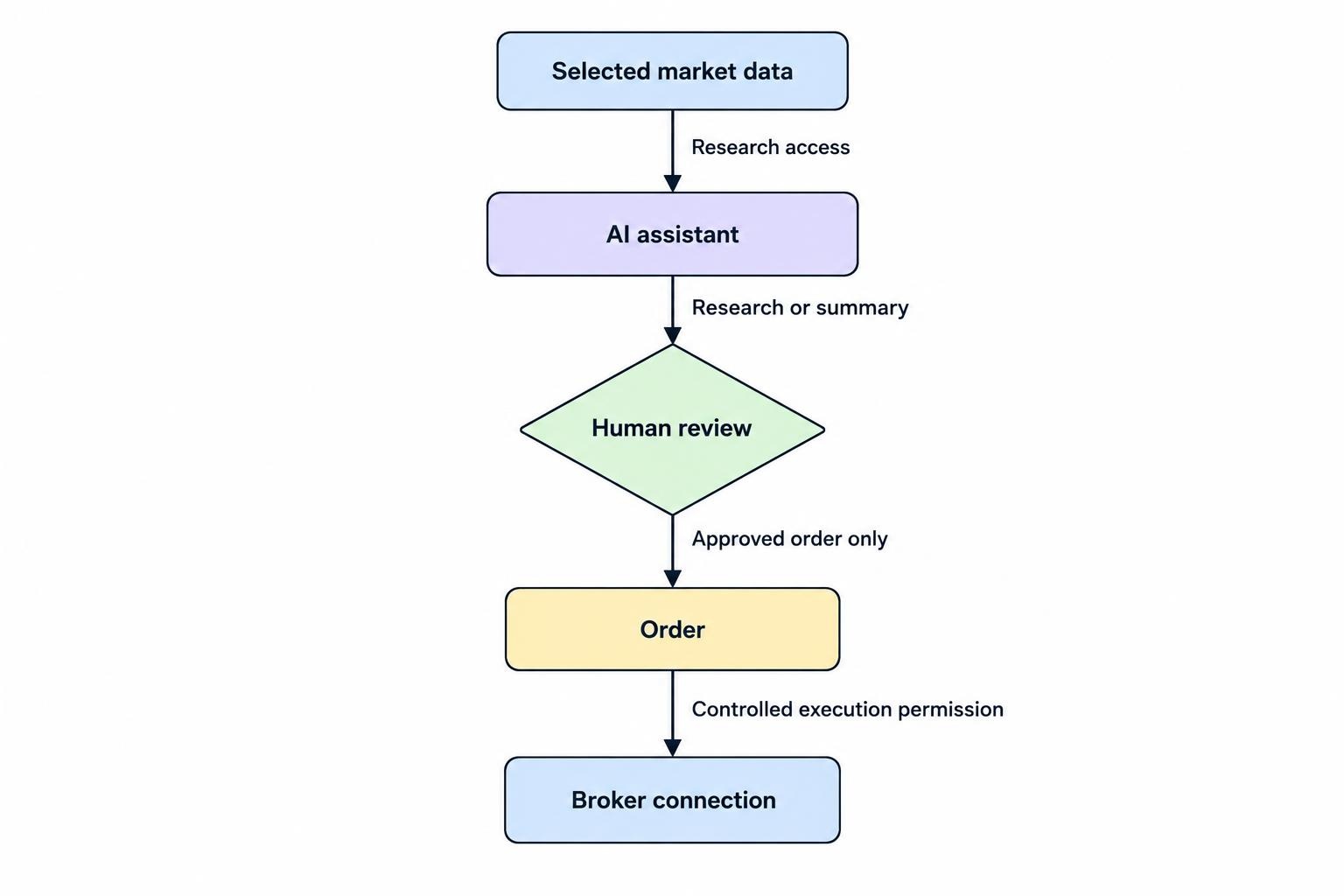
If you automate decisions, use narrowly scoped credentials, monitor account activity, and set limits that can stop unwanted actions. Keep logs, but avoid recording secrets or unnecessary personal details in them. Alerts should help you spot unusual access or orders without sending sensitive account information to public channels. A setup that is useful during normal trading should still be safe when a connection fails or an integration behaves unexpectedly.
What to do after sharing sensitive information
If you accidentally submit a password, API key, or authentication secret, act as if someone else could use it. Change the password or revoke the key promptly, then review recent sign-ins, connected applications, and account activity. If a service allows you to delete a prompt or uploaded file, use that option, but don’t assume deletion removes every retained copy. Contact the provider through a verified support channel if the data may include account details or records that could identify you.
If you suspect access to a brokerage or email account, contact the institution using the phone number or website you already know to be genuine. Secure the email account as well, since it may be used to reset other passwords. Save relevant alerts and messages, but avoid forwarding sensitive material through unverified channels. When financial information is exposed, follow the account provider’s instructions and consider what other accounts use the same credentials or personal details.
For routine use, a short check before every upload is enough: remove identifiers, leave out secrets, confirm the recipient, and ask whether the assistant truly needs the data. If the answer is no, keep it out of the prompt.