A broker API lets software communicate with a brokerage account: it can request account data, retrieve market information, submit or cancel orders, and receive updates about executions. For a trading system, that connection is the boundary between an idea on a screen and an instruction that can affect real money. A correct API call does not guarantee a good trade, and a successful response does not always mean an order filled as expected. The system must handle permissions, changing account state, network interruptions, partial fills and rejected orders.
Before connecting anything, decide what the system needs to do and what it must never be allowed to do. A tool that reads positions and sends alerts has a different risk profile from one that can place live orders. Keep the first version narrow: confirm access, retrieve account state, test order handling in a simulation environment if available, and add live trading only after the system can detect and recover from failures. This guide focuses on the practical design of that connection. It does not recommend a broker or guarantee that a particular API supports every feature described here.
What a broker API connection does
A broker API is a software interface provided by a brokerage or its technology provider. Your application sends requests in the format the interface accepts, and the service returns data or reports the result of an action. The API may expose account balances, open positions, order status, historical prices, real time quotes, or some combination of these. Access varies by broker, account type, market and jurisdiction. A feature that appears in an API overview may still be unavailable for a particular account, instrument or trading session.
The API does not usually give a retail trading system a direct line to an exchange. It communicates with the broker’s systems, which validate and process requests under their own rules. Those checks can include whether the account is authorized for an instrument, whether the market is open, whether the order parameters are valid, and whether the account has enough buying power. In the United States, SEC Rule 15c3-5 requires covered broker-dealers with market access to maintain controls designed to manage financial and regulatory risks. The rule applies to those broker-dealers; it is not a substitute for safeguards in a customer’s own software. SEC explanation of Rule 15c3-5 market-access controls.
At a high level, an API integration has four parts: authentication, a request and response channel, an order and account data model, and local controls around the system’s actions. The details differ between providers. Some use web requests for orders and account queries, with a separate streaming connection for updates. Others offer a FIX interface, a broker-specific library, or a combination. FIX is an industry protocol for exchanging trading messages; its session layer also defines ordered, recoverable message delivery across sequential connections. FIX Trading Community overview of the FIX session layer.
Choose the connection type for the job
Do not choose an API style based on a label such as “fast” or “professional.” Start with the workflow: does the system need account data once a minute, or continuous updates? Does it submit a handful of orders, or require a persistent session with sequenced messages? Can the system tolerate a short delay, or does the strategy depend on tightly controlled timing? A more elaborate connection adds operational work. It is not automatically safer or more suitable for a retail strategy.
| Connection type | Common role | Practical point |
|---|---|---|
| REST or HTTP API | Account queries, order submission, cancellation and status checks | Requests are discrete. Your system must handle timeouts, retry rules and rate limits. |
| WebSocket or another streaming interface | Live quotes, order updates and account events | A persistent connection can drop. Reconnect logic and state recovery matter. |
| FIX | Structured trading messages between firms and market participants | Session setup, message sequencing and broker-specific configuration can require more technical work. |
| Broker library or gateway | A provider’s supported way to connect an application to its service | Convenience depends on the library, its supported environments and the provider’s update process. |
These categories can overlap. A broker may use one interface for account authorization, another for historical data, and a streaming connection for quotes or executions. FIX itself specifies trading message content and workflows, while transport and session arrangements can vary. The FIX Trading Community introduction to FIX describes that separation. For a retail system, the practical task is less grand: establish which exact endpoint, protocol version, instruments and order types the account supports, then test those functions directly.
Check support and permissions before writing code
Read the provider’s API documentation and account terms before building around an assumed feature. Confirm that API access is enabled for the account, identify supported asset classes and order types, and check whether market data requires separate authorization or a subscription. Find out how the system obtains paper or simulated access, whether the simulation uses live or delayed prices, and whether the same credentials or endpoints can reach a live account. These details change how the connection should be isolated and tested.
List the minimum permissions required. If the system only needs to read account balances or positions, do not grant it authority to submit orders. If trading permission is necessary, check whether it can be restricted by account, instrument or another available control. API permissions and capabilities vary, so do not assume that a “read only” setting exists or behaves the same way across services. Keep the account login, application credentials and trading authorization separate wherever the provider supports that distinction.
Make a simple capability table before implementation. Mark each feature as confirmed, unavailable or not yet tested. Include account data, price data, order placement, cancellation, status updates, instrument lookup and any required session or market-hours information. Note whether the provider limits request frequency, restricts concurrent connections, or requires periodic reauthorization. This prevents a common design mistake: writing strategy logic that depends on an endpoint the account cannot actually use.
Authentication and API key security
Authentication proves that the application is permitted to access the service. One API may issue a key or secret; another may use an authorization flow that grants a token after the account owner approves access. These mechanisms are not interchangeable, and the provider’s instructions determine the supported flow. Treat every credential and token as a secret. If someone obtains a credential with trading permission, they may be able to send requests as the authorized application, depending on the permissions attached to it.
Do not paste credentials into source code, a notebook, a shared document, a chat, or a public repository. Store them in an appropriate secrets manager or protected environment configuration, limit access to the process that needs them, and avoid printing them in logs. Use separate credentials for development and live access if the provider allows it. Rotate or revoke credentials if they are exposed, and check that revocation actually prevents further requests. The IETF’s current OAuth 2.0 security best practices cover threats such as token leakage and unsafe authorization flows; follow the broker’s supported implementation rather than improvising your own.
Where authorization uses OAuth, an access token is not just a convenient login string. Its scope, expiry, storage and renewal affect what the application can do and for how long. Do not place tokens in browser-facing pages or client-side code intended to be public. A server-side application can keep authorization material away from the user interface and limit which components can retrieve it. If a provider uses API keys instead, apply the same practical discipline: least privilege, protected storage, no secret in logs, and a clear revocation plan.
Also protect the machine and account used to run the system. Strong sign-in protection for the brokerage account, operating-system updates, encrypted storage, restricted user access and secure backups reduce risks beyond the API itself. Keep secrets out of crash reports and error messages, which are often copied into support tickets. A carefully protected key does not compensate for a computer where any local user can read the application’s configuration.
Separate strategy decisions from order execution
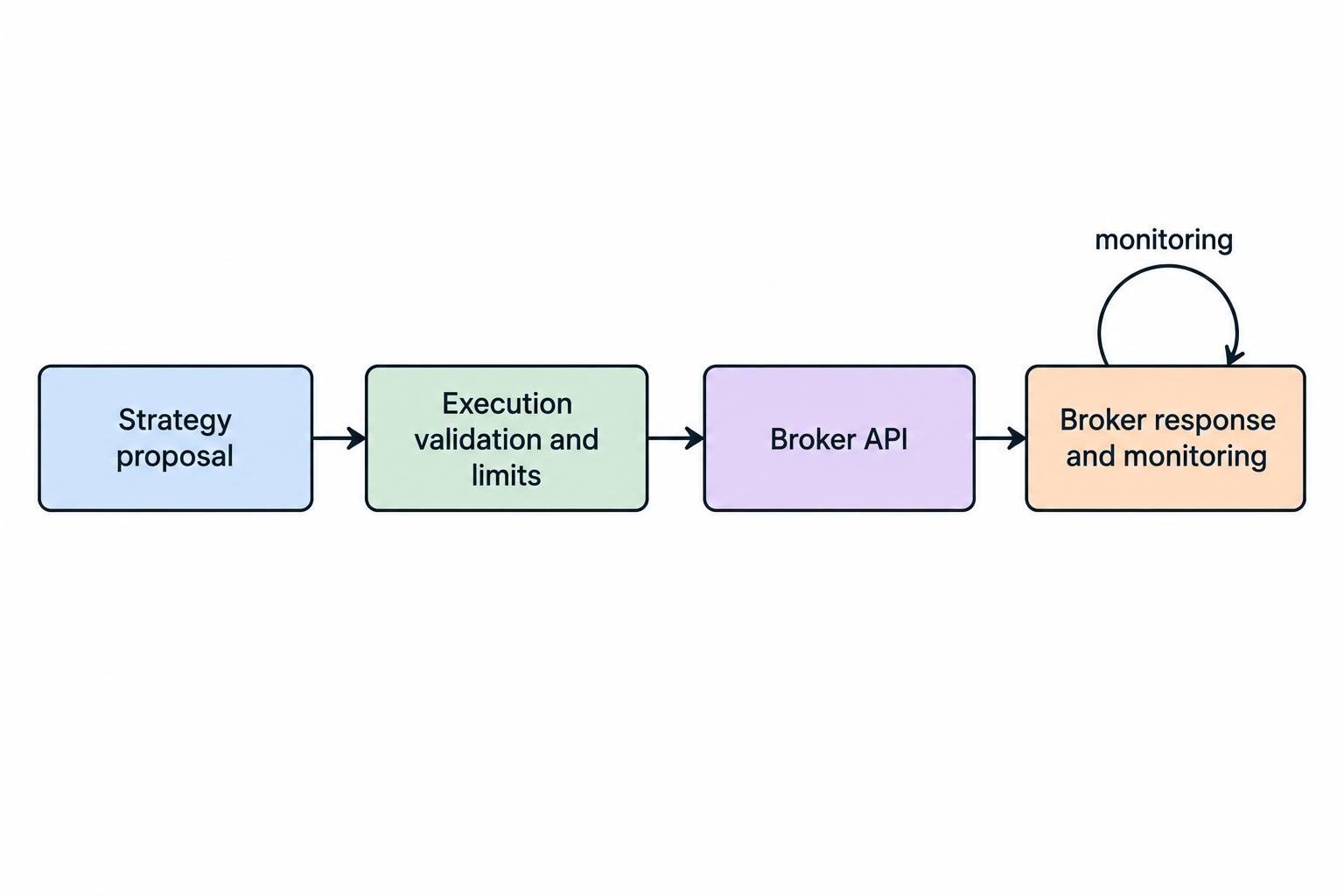
A clean design separates the strategy from the broker connection. The strategy can produce a proposed action, such as “buy a defined quantity if the signal and risk checks pass.” A separate execution component translates that proposal into the provider’s required request format, submits it, and records the response. This separation makes it easier to test strategy logic without sending orders, and to change a broker integration without rewriting the model.
Use an explicit boundary between proposal and permission to trade. Before sending an order, check that the instrument is recognized, the quantity and price are valid, the account is in the expected state, and the order fits the system’s limits. Reject missing or malformed values rather than guessing. For a market order, verify that the strategy is allowed to use that order type; for a limit order, confirm that the intended price is present and expressed in the correct units. A blank price must never quietly turn into a different order.
Write down the exact meaning of the strategy’s inputs. A symbol may not identify an instrument uniquely across markets, currencies or contract types. Quantities may represent shares, contracts or lots. Prices can have different tick increments. Time in force, extended-hours eligibility and other order options can also change the behavior of a request. Convert these fields deliberately, validate them before submission, and retain the original proposal alongside the request actually sent.
For a broader view of how research, signal generation, risk checks and review fit together, see the guide to building an AI-assisted trading workflow. The broker connection belongs at the execution end of that process. It should not be allowed to silently rewrite the signal or take on responsibilities the strategy never specified.
Understand the order lifecycle
An order request can move through several states: it may be received, accepted, working, partially filled, filled, cancelled, rejected or expired. The exact names and sequence vary by API. A successful HTTP response, for example, may mean only that the broker accepted the request for processing. It does not necessarily mean the order executed. Your system needs a persistent record of the broker’s order identifier and subsequent status updates.
Track at least two identifiers where possible: the identifier created by your own application and the broker’s order identifier. The local identifier helps connect a strategy decision to the request and any later events. The broker identifier helps query or cancel the order using the provider’s interface. Store the submitted instrument, side, quantity, order type, limit price if applicable, timestamps, response and status changes. Avoid relying on a single in-memory variable that disappears after a restart.
A partial fill requires careful accounting. If an order for 100 shares fills 35, the remaining 65 may still be working, depending on the order and broker response. The position is no longer the same as it was before submission, yet the original order may remain active. Update the local view from execution events and confirm the broker’s current order state before submitting a replacement. The dedicated guide to order types, partial fills and position reconciliation covers these cases in more detail.
Cancellations need the same care. A cancel request can be rejected, delayed or arrive after a fill. Do not mark an order as cancelled merely because the system sent a cancellation request. Wait for confirmation or query the broker’s order state. If an order’s final status is unclear, stop placing related replacement orders until the system has resolved whether the original remains live. Otherwise, a delayed fill can leave the account holding twice the intended exposure.
Prevent duplicate orders after a timeout
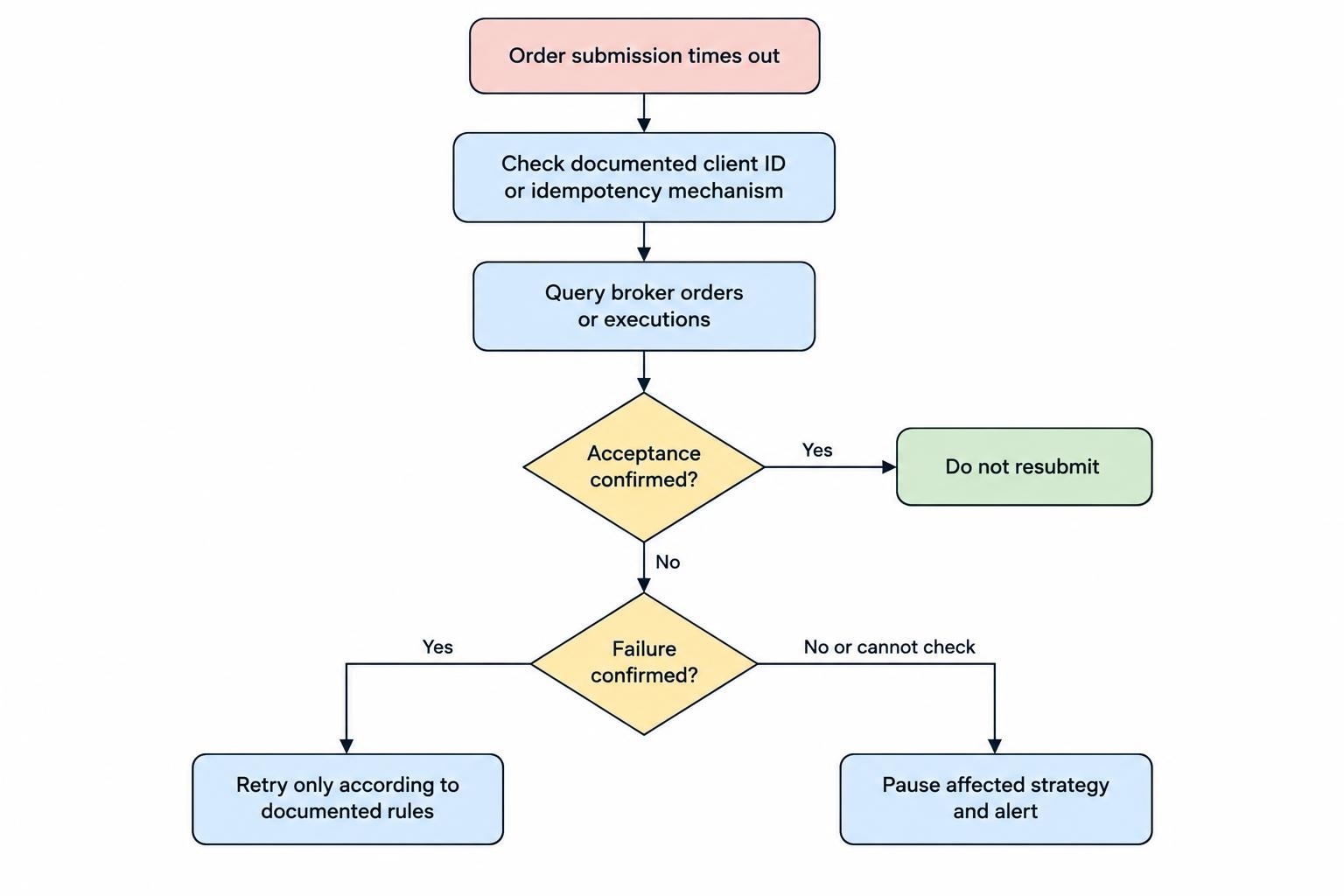
One of the riskiest connection failures is an ambiguous response. Your application sends an order, the network times out, and the system cannot tell whether the broker received it. Blindly retrying can submit the same trade twice. A timeout means the response was not received in time; it does not prove that the request failed at the broker.
Before retrying, look for a provider-supported client order identifier or idempotency mechanism. If one is available, use it exactly as documented and retain the identifier across retries. If there is no such mechanism, query open orders, recent orders or executions to establish whether the original request was accepted. If the broker’s state cannot be checked, pause the affected strategy and raise an alert rather than sending another order on a guess.
Retries should be limited and designed around the kind of request. Retrying a read-only account query is usually different from retrying an order submission. Respect rate limits and error responses, and use a delay policy that does not create a burst of repeated calls. Do not treat every error as temporary: an invalid order, unauthorized account or unsupported instrument requires a correction, not another identical request. See how to prevent duplicate orders and handle connection failures.
Keep local state aligned with the broker
A trading system maintains a local view of positions, cash, open orders and recent executions. That view can become stale after missed events, a restart, a manual trade or a connection interruption. The broker’s account state is the authoritative record of what the account currently shows. On startup, after reconnecting, and at planned intervals, compare the local view with account and order data retrieved from the broker.
Do not assume a streaming connection delivers every event without interruption. Record the last event or sequence marker that the provider makes available, if applicable. After a reconnect, request a current snapshot and reconcile it with stored records. If the interface has no sequence numbers or replay facility, design for a fresh query to rebuild state. The appropriate method depends on the API; the central rule is simple: after a gap, verify rather than presume.
Reconciliation should detect mismatches instead of automatically “fixing” them with new trades. If the local system expects one position but the broker shows another, pause new orders for that instrument or account, record the discrepancy, and investigate. The cause might be a partial fill, an external manual order, a rejected request or a lost update. Automatically trading to force the account back to the model’s expected position can turn a bookkeeping issue into a real exposure problem.
Decide how manual activity will be handled. If the account owner may trade separately, the software should identify activity it did not create and either incorporate it under defined rules or pause. A system that assumes exclusive control of an account should make that assumption explicit. Otherwise, a human can change a position while an automated process continues acting on yesterday’s state.
Use simulation and staged testing
A paper or simulated account can help test authentication, request formatting, order-state tracking, reconnection behavior and basic reconciliation without placing live orders. It cannot establish that live execution will match simulated results. Simulated fills may not reflect actual liquidity, queue position, market impact, latency or the provider’s live handling of order types. A successful test proves only the parts that the simulation actually exercises.
Test failure cases, not only the happy path. Use a simulation or controlled test environment to check expired credentials, rejected requests, duplicate submissions, partial fills, delayed responses, disconnections and application restarts. Confirm that the system logs the problem and stops or recovers according to a defined rule. Test that cancelling an order does not erase its history, and that restarting the process does not cause it to resubmit orders simply because it lost its local memory.
Move through clear stages: read account data, submit a test request in an approved simulation, observe status updates, test cancellation and recovery, then consider tightly limited live operation only if the integration behaves as designed. Start live with strict quantity and exposure limits. Keep a human able to halt the process. For a closer look at what simulation can and cannot establish, use the guide to paper trading an AI system.
Backtests are a separate check. They do not test whether the API connection works, whether orders are rejected, or whether actual fills match assumed prices. Before treating a model as ready for an API, account for transaction costs and fill assumptions in testing. The guide to including fees, spreads, slippage and financing costs in backtests addresses that research problem.
Monitor the connection and set stop conditions
Record enough information to reconstruct what happened without exposing secrets. Useful logs include timestamps, local and broker order identifiers, request type, instrument, sanitized response, status change, connection state and error category. Never log passwords, API secrets, access tokens or full authorization headers. Keep clocks synchronized where possible, and make timestamps consistent so an order request can be matched to the broker’s event history.
Use alerts for states that need attention: authentication failure, repeated API errors, a lost stream, an order with an unresolved status, a position mismatch, or a risk limit being reached. Alerting is not a replacement for safe behavior. The trading process should have defined rules for when it may continue, when it must pause, and when it must require a person to review the account. The guide to monitoring an automated trading system with logs and alerts covers operational monitoring.
Set a stop condition for critical failures. Depending on the strategy and account, this might mean stopping new orders while continuing to monitor existing orders, or shutting down order submission entirely. Do not assume that stopping the application cancels working orders; cancellation is a separate broker request and needs confirmation. A human should know how to inspect open orders and positions through the provider’s normal account interface if the software becomes unavailable.
Choose limits that can be checked before every order. Examples include a maximum order quantity, a maximum number of open orders, an allowed instrument list, a maximum position size or a cap on daily activity. The right controls depend on the strategy and account. Do not lift them just because they interrupt a trade. If a limit blocks an intended order, investigate whether the configuration, account state or strategy proposal is wrong. See the guide to kill switches, trading limits and human oversight.
Common integration mistakes
- Assuming “accepted” means “filled.” Track the order through final status and execution events.
- Retrying a timed-out order without checking its state. The first request may already be active.
- Using live credentials during development. Keep test and live environments separate when supported.
- Storing secrets with the strategy code. Restrict access and keep credentials out of logs, notebooks and repositories.
- Ignoring provider limits or account permissions. A request can be correctly formed and still be unsupported or unauthorized.
- Trusting local positions after a disconnect. Rebuild or reconcile state with broker data before continuing.
- Assuming a shutdown cancels working orders. Check and manage open orders explicitly.
A practical pre-live checklist
Before enabling real order submission, confirm that the account owner has authorized the connection and that the exact API features are supported. Verify that credentials are stored securely, permissions are no broader than necessary, and live access cannot be triggered by an accidental switch in a test environment. Confirm that each order is validated, logged and associated with an application identifier before submission.
Then check recovery: What happens if a request times out? How does the system identify a duplicate? What does it do after losing a stream or restarting? Can it query the broker’s open orders and positions before resuming? Is there a tested procedure for pausing new orders while leaving existing orders visible and manageable? If any answer is “we will figure it out when it happens,” the connection is not ready for unsupervised live use.
Finally, make responsibilities clear. The strategy decides what it would like to trade; the execution layer checks whether the proposed action is valid and permitted; the broker processes the request under its own rules; monitoring reports what happened. Keep those roles distinct, preserve a record of every state change, and pause when the system cannot determine the account’s true state. A broker API can automate a request. It cannot make an unclear request, missing safeguard or stale position safe.